
TL;DR
- Tracker.gg exposes detailed stats that can lead to lobby dodging and targeted gameplay
- Privacy requires account creation, Valorant linking, and clicking ‘Make Private’ in the Valorant tab
- Going private immediately hides all stats but doesn’t remove existing data from Tracker’s database
- Common mistakes include incomplete account linking and missing the subtle privacy button location
- Consider alternative privacy approaches like using alt accounts or selective stat sharing
Tracker.gg stands as one of the premier third-party platforms that Valorant competitors utilize to analyze comprehensive performance metrics. The service delivers detailed insights into critical statistics such as your highest achieved rank, kill-death-assist ratios, precision percentages, victory rates across different game modes, and weapon-specific performance data.
While this analytical tool serves as an excellent resource for identifying personal weaknesses and tracking improvement over time, many competitors exploit it to scout their allies’ and opponents’ capabilities before matches even commence. This practice frequently results in players abandoning games when they encounter teammates displaying what they perceive as suboptimal statistics, creating frustrating experiences for everyone else committed to playing through the match.
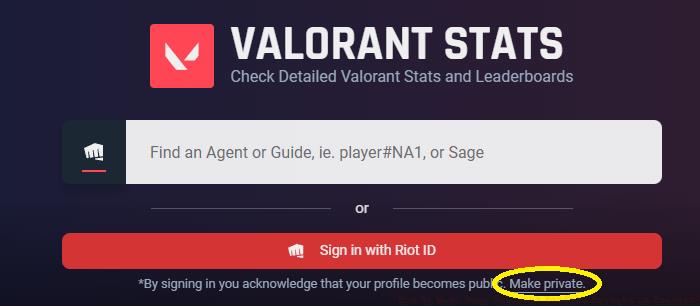
This widespread stat-checking behavior makes concealing your Valorant profile on Tracker a strategic decision if you prefer keeping your performance metrics confidential from other players. However, many users encounter unexpected challenges when attempting to obscure their Valorant statistics on the platform, as the privacy configuration process contains several non-intuitive steps that can confuse even experienced players.
This comprehensive walkthrough will guide you through each necessary procedure to successfully conceal your Valorant profile on Tracker, ensuring your competitive data remains accessible only to you.
Below, we’ve detailed the complete sequence of actions required to transition your Valorant Tracker profile to private status:
- Establish a Tracker.gg account using your preferred authentication method
- Connect your active Valorant gaming account with your newly created Tracker profile through the account linking interface
- Navigate specifically to the dedicated ‘Valorant’ section within your Tracker dashboard
- Locate the discreet ‘Make Private’ option positioned directly beneath the primary search bar and activate this setting
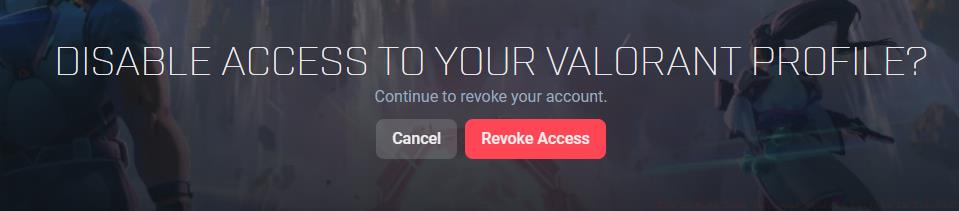
Following these procedures correctly will successfully configure your Valorant Tracker profile with private visibility settings. Once implemented, other competitors will lose access to viewing your statistical performance data and commonly selected agents, though the platform will continue tracking your matches internally for your personal review.
Understanding the implications of privacy settings requires recognizing that while your stats become invisible to others, Tracker.gg continues collecting your match data for your personal analytical use. The platform maintains this information in its databases but restricts public access according to your privacy preferences.
Many players encounter specific stumbling blocks during this process, most commonly failing to properly complete the account linking phase or overlooking the somewhat inconspicuous placement of the ‘Make Private’ button. Ensure your Valorant account shows as successfully connected in your Tracker profile before attempting to adjust privacy settings, as incomplete linking represents the most frequent point of failure.
For those seeking alternative approaches to stat privacy, consider maintaining separate accounts for competitive versus casual play, or explore other tracking services with different privacy defaults. Each platform operates with distinct data collection and sharing policies, so researching alternatives might better suit your specific privacy requirements. If you’re looking to improve your gameplay beyond privacy concerns, our Weapons Unlock guide offers valuable insights into weapon mastery that can enhance your performance regardless of visibility settings.
Action Checklist
- Create Tracker.gg account using email or social authentication
- Complete Valorant account linking in Tracker profile settings
- Navigate to Valorant section and locate ‘Make Private’ below search bar
- Verify privacy activation by checking your profile from another account
No reproduction without permission:GameCDjnh » How To Make Your Valorant Profile Private in Tracker? Complete guide to hiding your Valorant stats on Tracker.gg with privacy tips and common pitfalls