
TL;DR
- Connect your ESO and Twitch accounts through the official website’s Linked Accounts section
- December 2022 features four major events with varying watch requirements from 15-60 minutes
- Stream muting disables drop progress – use system volume controls instead
- Claim rewards immediately when progress reaches 100% to avoid missing drops
- All ESO streams become drop-enabled during festival events for maximum accessibility
Crown Crates represent premium loot containers available exclusively through The Elder Scrolls Online’s Crown Store. These special items typically require Crowns, the game’s real-money currency, though players can gain access to these crates via Crown trading in ESO with gold coins, making them accessible through either financial investment or in-game economic activity.
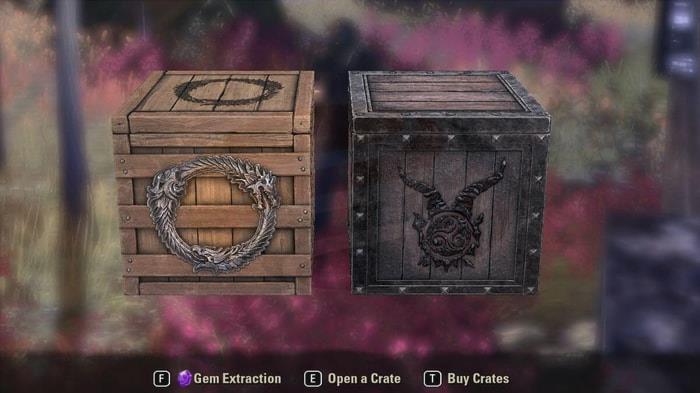
Fortunately, free acquisition opportunities exist through Twitch Drops integration. Between December 15-18, 2022, viewers could earn Crown Crates approximately every hour by watching designated ESO broadcasts. Understanding the mechanics behind these rewards significantly enhances your collection strategy.
*Critical reminder: Stream muting prevents drop progression. The system detects audio activity, so always use system volume controls rather than browser mute functions to ensure your viewing time counts toward rewards.
For players unfamiliar with the integration process, this comprehensive guide provides detailed instructions for establishing the crucial connection between your gaming and streaming accounts.
1. Begin by launching your preferred web browser and securely logging into both your Twitch and Elder Scrolls Online accounts. Ensure you’re accessing the official ESO website to prevent security issues.
2. Navigate to the Linked Accounts section within your account management dashboard. The absence of a connection symbol next to the Twitch selection confirms your profiles remain unlinked.
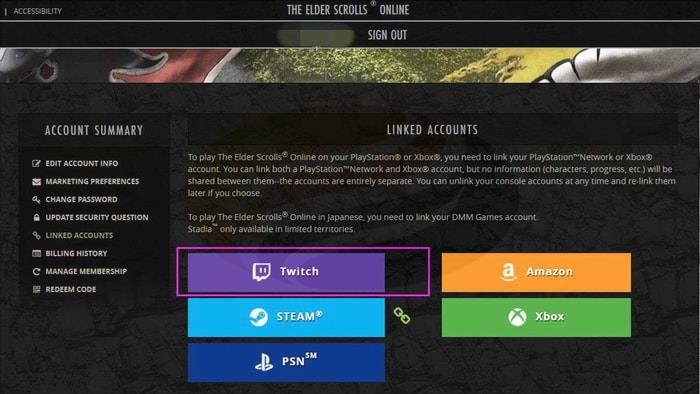
Visual confirmation: Missing link icon indicates unconnected accounts
3. Select the Twitch option to trigger the authentication pop-up window. This secure portal facilitates the permission exchange between platforms.
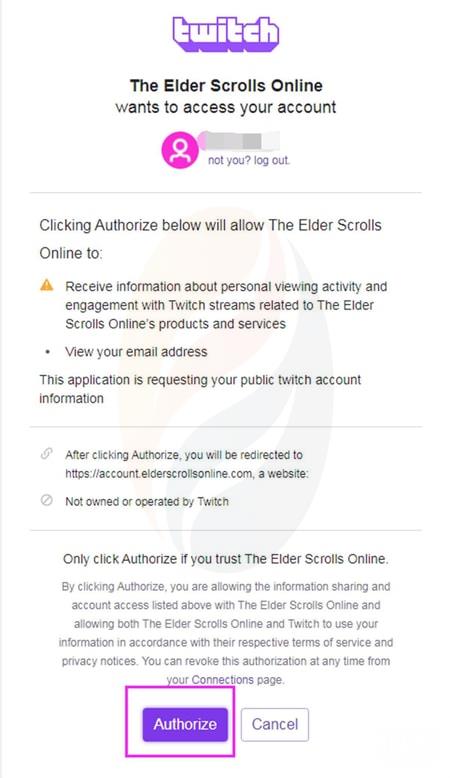
Authorization interface: Final step before connection completion
4. Click the Authorize button positioned at the window’s base to finalize the linkage process. Your accounts will immediately synchronize, enabling drop eligibility.
Following successful integration, return to Twitch and locate ESO channels featuring Drop-enabled content. Rewards become claimable once the viewing progress indicator reaches full completion.
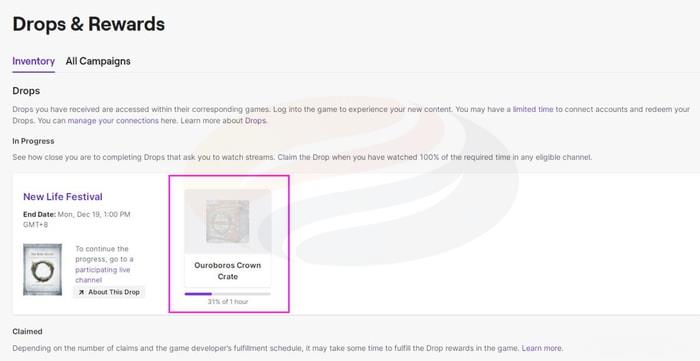
Progress monitoring: Track drop eligibility through the completion percentage indicator
The December 2022 calendar featured multiple engagement opportunities for acquiring Twitch Drops through various themed events:
New Life Festival
During this celebration, ALL ESO streams became Twitch Drop-enabled! Participants earned rewards by viewing content for minimum 60-minute intervals.
Event Period: December 15, 2022, 10:00 AM EST – December 18, 2022, 11:59 PM EST
ESO Live at Home
This specialized broadcast required only 15 minutes of viewing time to qualify for drops.
Schedule: December 16, 2022, 2:00 PM EST – December 16, 2022, 4:00 PM EST
ESO Christmas Carol
Another 15-minute commitment event, this holiday-themed session offered efficient reward acquisition.
Timing: December 20, 2022, 9:00 PM EST – December 20, 2022, 11:00 PM EST
Happy Holidays ESO Fam
Concluding the month’s activities, this festival again activated drops across all ESO channels with 60-minute viewing requirements.
Duration: December 26, 2022, 10:00 AM EST – December 31, 2022, 11:59 PM EST
Beyond basic participation, experienced players employ sophisticated techniques to enhance their Twitch Drop yields. Multi-stream management allows simultaneous progress across different events, though this requires careful attention to each platform’s terms of service. Setting reminders for event start times prevents missing limited-duration opportunities, particularly the shorter 2-hour windows.
Common mistakes include forgetting to claim completed drops promptly – unclaimed rewards may expire. Additionally, many players mistakenly believe background tab browsing qualifies for progress, but most streams require the content to be actively visible.
For optimal efficiency, prioritize events with shorter watch requirements during limited timeframes. The 15-minute commitments during 2-hour windows typically offer better reward-per-time ratios than the hour-long festival requirements.
Understanding drop cooldown periods and claim limitations helps prevent frustration. Always verify your connection status before major events begin, as authentication tokens can occasionally expire requiring re-linking.
For comprehensive gaming strategies beyond Twitch Drops, explore our Complete Guide to master various gameplay elements. Weapon enthusiasts should consult our detailed Weapons Unlock guide for armament optimization, while class selection specialists will benefit from our Class Guide for specialization advice.
Action Checklist
- Verify ESO and Twitch account login credentials before beginning the linking process
- Navigate to Linked Accounts section on official ESO website and confirm Twitch connection status
- Complete authorization process through Twitch pop-up window
- Bookmark Drop-enabled ESO channels in advance of event start times
- Monitor progress bars and claim rewards immediately upon reaching 100% completion
- Use system volume controls instead of browser mute functions during viewing sessions
No reproduction without permission:GameCDjnh » How to Link Your ESO Account to Twitch Master ESO Twitch Drops with expert linking techniques and optimized viewing strategies for maximum rewards