
TL;DR
- Valorant doesn’t display playtime in-client, requiring third-party trackers like tracker.gg
- Calculate total hours by summing time across all game modes while selecting ‘All Acts’
- Access comprehensive stats including KDA, weapon performance, and map-specific analytics
- Use performance data to identify strengths, weaknesses, and optimal agent selection
Since its explosive debut in June 2020, Valorant has captivated millions with its unique fusion of tactical shooting mechanics and character-based abilities. The game’s competitive ecosystem continues to expand, yet many players discover an unexpected gap: Riot Games’ official launcher doesn’t provide built-in playtime tracking functionality. Unlike Steam’s comprehensive hour counter, Valorant requires external solutions for monitoring your gaming investment.
This tracking limitation stems from Riot’s focus on competitive integrity rather than playtime metrics. However, dedicated third-party platforms have emerged to fill this void, offering detailed analytics that extend far beyond simple hour counting. These services provide the comprehensive gameplay insights competitive players need to refine their strategies and track progression over time.
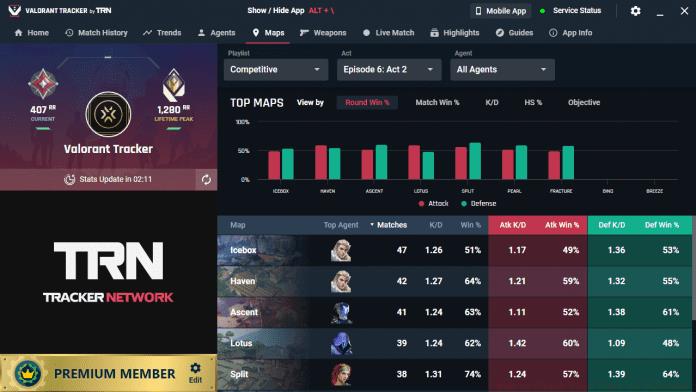
Navigating to tracker.gg/valorant reveals a straightforward process for connecting your Riot account and accessing detailed gameplay statistics. The platform serves as an authorized data aggregator, pulling information directly from Riot’s servers while maintaining account security through OAuth authentication protocols.
- Select ‘Valorant’ from the ‘All Games’ category menu on tracker.gg’s homepage
- Click the prominent ‘Sign in with Riot ID’ authentication button
- Carefully enter your Riot Games account credentials in the secure login portal
- Grant data access permissions by clicking the ‘Authorize’ confirmation button
This authorization process ensures your account remains secure while enabling comprehensive stat tracking. Many players overlook the importance of reviewing permission scopes during this step—always verify you’re granting access only to necessary gameplay data rather than full account control.

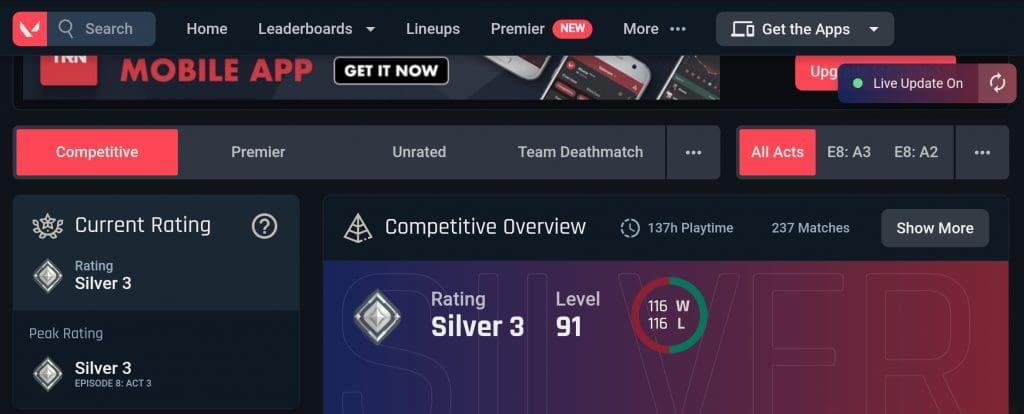
Once authenticated, tracker.gg presents your Valorant statistics in an organized dashboard format. While the platform doesn’t display a singular ‘total playtime’ metric, it provides detailed time breakdowns across all game modes including Competitive, Unrated, Spike Rush, and Deathmatch. Calculating your aggregate playtime requires manual summation of these individual mode durations.
The critical configuration often missed by newcomers is the ‘All Acts’ filter selection. Default views typically show only current Act statistics, significantly underrepresenting your actual investment. By activating the ‘All Acts’ filter, you access historical data across Valorant’s entire episodic structure, providing the comprehensive view needed for accurate total playtime calculation.
Advanced players should note that time tracking excludes menu navigation, agent selection screens, and custom game modes. For precise calculations, maintain a spreadsheet documenting weekly playtime across modes, creating a personalized tracking system that complements the platform’s limitations.
Beyond basic playtime metrics, tracker.gg delivers comprehensive performance analytics that transform raw data into actionable improvement strategies. The platform tracks your Kill/Death/Assist ratio across different agents, weapon-specific efficiency, win-loss percentages per map, and trend analysis over multiple Acts. These metrics collectively paint a detailed picture of your gameplay strengths and developmental opportunities.
Strategic players leverage this data to identify agent synergies that complement their natural playstyles. By analyzing performance patterns, you can determine whether aggressive duelists or strategic controllers better suit your tactical approach. This Class Guide principles apply similarly to Valorant’s agent selection—understanding role specialization dramatically impacts competitive success.
The platform’s comparative analytics enable benchmarking against players in your rank tier, highlighting specific areas for focused improvement. Regular review of these metrics, combined with the comprehensive strategies found in our Complete Guide to competitive gaming, creates a powerful framework for systematic skill development and ranked progression.
Weapon performance data proves particularly valuable for optimizing your economic decisions during matches. Understanding which firearms deliver your highest efficiency per credit spent, similar to the strategic considerations in our Weapons Unlock guide, can significantly impact your round-to-round success rate and overall competitive performance.
Action Checklist
- Navigate to tracker.gg/valorant and authorize your Riot account
- Switch to ‘All Acts’ filter to access complete historical data
- Sum playtime across all game modes for total hours calculation
- Analyze agent-specific performance metrics to identify optimal character selection
- Review weapon efficiency data to optimize in-game economic decisions
No reproduction without permission:GameCDjnh » How to Check Play Time in Valorant? Master Valorant playtime tracking and performance analytics to optimize your gameplay strategy