
TL;DR
- Debug items provide thousands of decorative world objects not normally available in build mode
- Requires enabling testingcheats true followed by bb.showhiddenobjects command
- Items are purely decorative with no functional interactions for your Sims
- Use specific search terms like “debug” or “**” to filter through thousands of options
- Strategic placement can create immersive, realistic environments without performance issues
If your Sim’s residential space feels uninspired or lacks that special ambiance, debug items offer the creative solution you’ve been seeking. While the standard build/buy catalog provides substantial customization options, these hidden assets deliver the finishing touches that transform ordinary lots into extraordinary environments.
Debug items constitute thousands of background objects developers use to populate the game world naturally. These include environmental elements like varied foliage, architectural details, street furniture, and atmospheric props that create lived-in spaces. Unlike regular objects, debug items serve exclusively decorative purposes—your Sims cannot interact with them functionally, making strategic placement crucial for both aesthetics and gameplay flow.
One critical consideration involves performance optimization. While these items don’t impact gameplay mechanics, excessive use can affect game performance, particularly on lower-end systems. Strategic placement focuses on visible areas while minimizing objects in spaces your Sims rarely frequent.
To access debug items, you must first activate the game’s developer tools through cheat codes. This foundational step unlocks the console where you’ll input specific commands.
The activation sequence begins with opening the command console:
- Simultaneously press Ctrl+Shift+C (Windows) or Command+Shift+C (MacOS)
- Observe the text input field appearing in the top-left display area
- Enter ‘testingcheats true’ exactly as shown
- Press Enter to execute (confirmation message ‘Cheats are enabled’ should appear)
With cheats now active, proceed to the debug-specific command:
- Reopen the command interface using the same keyboard shortcut
- Input ‘bb.showhiddenobjects’ precisely
- Execute with Enter (no confirmation message, but functionality is active)
For comprehensive access, many builders recommend additionally entering ‘bb.showliveeditobjects’ which reveals even more world-editing tools and assets beyond the standard debug collection.
Navigating thousands of debug items requires efficient search strategies. Once activated, access these items through the build/buy catalog by entering specific search terms. The most effective includes simply typing “debug” which filters to relevant objects. For even broader results, many experienced builders use “**” (two asterisks) to display every available object in the game, including normally hidden assets.
Strategic placement techniques maximize visual impact while maintaining performance. Cluster smaller debug items together to create dense, realistic environments like forest floors or cluttered workstations. Use the alt-key placement (hold alt while moving objects) for precise positioning without grid restrictions. Layer items at different heights using the 9 and 0 keys to raise and lower objects for more natural arrangements.
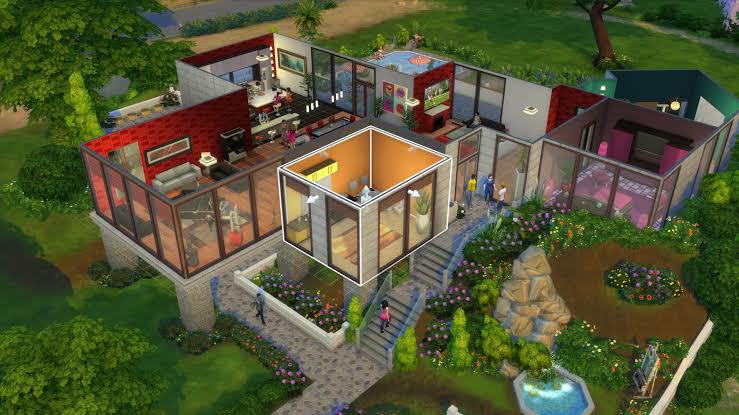
Creative applications extend beyond simple decoration. Use debug items to create custom landscaping that matches specific architectural styles, build realistic commercial districts in residential areas, or design photogenic backgrounds for your Sim’s social media content. The strategic placement principles used in debug item decoration share similarities with weapon positioning in other games—both require considering sightlines and functional space.

Several frequent errors can prevent successful debug item access. The most common involves incorrect cheat code syntax—ensure you’re entering ‘testingcheats true’ not ‘testingcheats on’ or other variations. Case sensitivity doesn’t matter, but spelling and spacing must be precise. If commands don’t work, try quitting and reloading the game, as occasional glitches prevent proper cheat activation.
Performance issues typically arise from overpopulation of debug items rather than the items themselves. Limit extensive debug item use to lots where you’ll actually spend gameplay time. For showcase lots, you can be more generous with placement. The performance optimization approaches in other games apply here too—balance visual density with smooth gameplay.

If debug items disappear after lot reloading, this usually indicates improper placement that conflicts with game mechanics. Ensure items aren’t blocking essential routing paths or placed inside structural elements. For persistent issues, the systematic troubleshooting methodology used in other gaming contexts applies—document what works versus what doesn’t to identify patterns.
Remember that debug items won’t appear in your household inventory and can’t be sold through normal means. To remove them, you must manually delete each item in build mode. This limitation makes careful planning essential before extensive debug item implementation.
Action Checklist
- Enable testingcheats true via Ctrl+Shift+C console
- Activate bb.showhiddenobjects and bb.showliveeditobjects
- Search catalog using “debug” or “**” filters
- Plan debug item placement considering performance and sightlines
- Use alt-key placement and height adjustment for natural arrangements
No reproduction without permission:GameCDjnh » How to Unlock The Sims 4 Debug Items? Master The Sims 4 debug items to transform bland lots into magical spaces with hidden objects