
TL;DR
- Macros automate up to 6 commands for spells, abilities, and equipment changes
- Organize 200 macro slots across 20 books for different job combinations
- Use /wait commands and recast timers for precise ability timing
- Backup macro data to PlayOnline servers to prevent loss
- Master gear swap macros to optimize performance in combat situations
Macros in FFXI
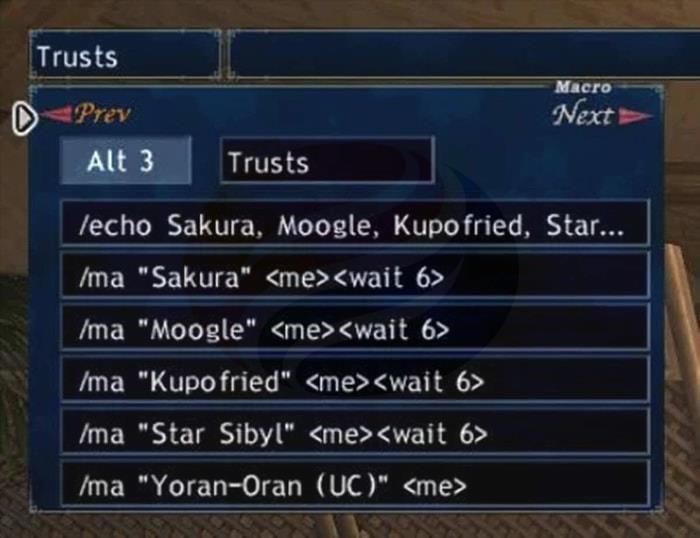
Macros serve as programmable shortcuts that execute sequences of one to six commands automatically. These powerful tools enable players to activate job abilities, initiate spell casting, control pets, switch equipment sets, broadcast messages to chat channels, and perform numerous other in-game actions with precision timing.
The game provides 20 Macro Books, each containing 10 palettes with two rows of ten macros. This structure gives each character access to 200 customizable macro slots. Importantly, macros are stored locally on your game client rather than the PlayOnline servers, meaning different characters on the same account maintain separate macro configurations. While macros created on one machine won’t automatically sync to others, the PlayOnline system does support manual macro data transfer between clients.
Creating Macro
Navigate to the “Macros” section within the game’s main menu to begin creating your automation sequences. Most experienced players recommend removing the default premade macros immediately, as they rarely align with optimized gameplay strategies. Instead, develop a logical organization system that groups related macros together—such as placing all healing spells in one book and weapon skill rotations in another.
Activate your macros using keyboard combinations: ALT + number key accesses one macro set, while CTRL + number key activates a separate group. If these standard shortcuts don’t respond, try ALT + SHIFT + number or CTRL + SHIFT + number to cycle through different macro palettes efficiently.
What are Macros used for?
Macros transform complex multi-step actions into single-button operations. Beyond basic functionality, they enable sophisticated gameplay optimization through these key applications:
Broadcasting critical combat metrics to your party, including current MP/HP percentages, available TP levels, and ability readiness status like Provoke availability.
Automating spell casting sequences for magic bursts and weapon skill combinations, eliminating tedious menu navigation during intense battles.
Creating customized emote sequences and character expressions for roleplaying scenarios and social interactions.
Streamlining frequently repeated actions like checking recast timers or switching between combat stances without interrupting gameplay flow.
Macros Books & Sets
Strategic macro organization begins with dedicating specific books to particular job and sub-job combinations. For example, maintain separate books for level 40 capped content, different merit party setups, or specialized situations like Besieged or Campaign battles.
Each Macro Book provides five essential management options that help maintain your automation systems effectively.
Confirm – designates the selected book as your active macro set when using Ctrl and Alt key combinations.
Rename – enables descriptive labeling using conventions like job levels (WHM75BLM37) to quickly identify content.
Copy – transfers all 20 macros from one book into temporary clipboard storage.
Paste – applies the clipboard’s stored macros to your currently selected book location.
Delete – removes all macros from the currently selected book, providing a clean slate for new configurations.

Many players encounter rotation issues where macro sets change unexpectedly during spell casting, leading to incorrect ability execution. This problem frequently occurs with jobs like Scholar where specific abilities can dynamically alter available spells. Building rotation safeguards directly into your macro code prevents these disruptive interruptions during critical gameplay moments.
Macros Syntax and Example
/ma Refresh
/wait 16
/recast Refresh
/wait 6
/echo **Refresh is Ready!**
This Refresh macro demonstrates optimal timing management: Line 1 (/ma) initiates the spell casting process. The 16-second wait accommodates the full recast timer, while the /recast command displays the remaining time in your chat window. The final 6-second wait includes a buffer for potential server lag, while the /echo command provides a clear visual notification when the spell becomes available again.
Macros for changing action
Action modification macros require careful planning to avoid unintended consequences. Equipment switching during combat presents particular challenges—changing weapons mid-action may disrupt TP accumulation or trigger unwanted ability delays. Strategic gear swapping should typically occur immediately after weapon skill completion rather than during active engagement.
1. Command: /ma Function: Casts a spell Example: /ma “Cure”
2. Command: /ja Function: Uses a job ability Example: /ja “Berserk”
3. Command: /ws Function: Uses a weapon skill Example: /ws “Shark Bite”
4. Command: /ra Function:Uses a ranged attack Example: /ra
5. Command: /pet Function: Uses a pet command Example: /pet “Predator Claws”
6. Command: /item Function: Uses an item Example: /item “Echo Drops”
7. Command: /target Function: Targets an object Example: /target PlayerName
8. Command:: /targetnpc Function: Targets closest NPC Example: /targetnpc
9. Command: /targetbnpc Function: Targets closest enemy NPC Example: /targetbnpc
10. Command: /lockon Function: Locks player’s view and direction to current selected target Example: /lockon
11. Command: /check Function:: Examines a player or monster Example: /check PlayerName
12. Command: /lastsynth Function:: Performs the last synthesis you did Example: /lastsynth
13. Command: /assist Function: Changes your target to the what the person you’re assisting is attacking Example: /assist TheTank
Macros for changing gear & equipment
Command: /equip
Subcommand: [area (main, sub, range, ammo, head, neck, L.ear, R.ear, body, hands, L.ring, R.ring, back, waist, legs, feet)] [“item name”] [storage number (0-8)]
Function: Equips a piece of equipment to a designated area. Leave out the item name to unequip. Equipment can only be stored in the Mog Wardrobe number you’ve chosen (Inventory=0) if you choose a storage number.
Command: /equipset
Subcommand: [set number] [options (echo,)]
Function: Equips a gear set. If the “echo” option is chosen, the resultant text is displayed; options may be left empty.
Command: /macro
Subcommand: [options (set, book)]
Function: Alters the active macro set/book
Command: /wait OR
Subcommand: [wait time]
Function: Waits for X amount of seconds (as explained in the example above).
Macros for party
Command: /recast
Function: Displays the recast of a spell
Command: /pcmd
Function: Performs a party command
Command: /acmd
Function: Performs an alliance command
Command: /p
Function: Displays a message in party chat
Command: /l
Function: Displays a message in link shell chat
Command: /echo
Function: Displays a message in chat for yourself
How to save, load, and delete Macros
Protect your carefully crafted macro configurations by regularly backing them up to the PlayOnline servers. This safeguard allows recovery if local data becomes corrupted or when transitioning to different gaming platforms. Access macro management through the Settings Management window, which opens by pressing the + key on your keyboard’s numpad while viewing your character screen.
Execute complete macro data removal using these input combinations: Keyboard users press Shift + Alt + Ctrl + D simultaneously, while controller players combine right stick button, left stick button, RB, and LB buttons to wipe server-stored macro configurations entirely.
Commonly used Commands and their functions for Macros
Command: (Ctrl or Alt) + [0-9] Function: Execute a macro
Command: (Ctrl or Alt) + Up Arrow or Down Arrow Function: Cycle through macro sets.
Command: (Ctrl or Alt) + Shift + [0-9] Function: Change the current macro set
Command: (Ctrl or Alt) + Left Arrow or Right Arrow Function: Macro selection.
Command: (Ctrl or Alt) + Enter or ‘Y’ Key Function: Execute selected macro
Conclusion
Mastering FFXI macros unlocks tremendous gameplay potential, enabling sophisticated automation that transforms complex multi-step actions into seamless single-command operations. As you progress to higher level content, well-designed macros become essential for coordinating skill chains, managing equipment swaps, and optimizing party performance. Begin experimenting with basic command sequences today to discover how macros can revolutionize your Vana’diel experience.
Action Checklist
- Clear default macros and organize 20 books by job combinations
- Create basic spell casting macros with /wait and /recast commands
- Develop gear swap macros for different combat situations
- Backup macro data to PlayOnline servers
- Test macro sequences in safe areas before combat use
- Create party communication macros for status updates
No reproduction without permission:GameCDjnh » A Complete Guide to FFXI Macros Master FFXI macros to automate combat, streamline spells, and optimize your gameplay efficiency