
TL;DR
- Redeem codes via the VP icon in Valorant’s top-right menu under ‘Prepaid Cards and Codes’
- Physical and digital gift cards provide instant VP with no regional restrictions within purchase zones
- Always verify code authenticity and check regional compatibility before purchasing gift cards
- Gift cards offer better gifting flexibility than direct skin purchases for friends
- VP typically appears in your account within 2-5 minutes after successful code redemption
As Valorant’s Night Market approaches in June 2025, strategic players are preparing their virtual wallets with gift card acquisitions to capitalize on limited-time cosmetic deals. Proper preparation ensures you won’t miss exclusive skin discounts during this highly anticipated seasonal event.
Before investing in Valorant gift cards, understanding the redemption mechanics for Valorant Points (VP) becomes essential. VP serves as the premium currency enabling cosmetic purchases, battle pass acquisition, and exclusive content unlocks throughout Riot Games’ tactical shooter ecosystem.
While multiple payment methods exist for VP acquisition, gift card redemption stands out for its simplicity and gifting flexibility. Unlike direct skin gifting that requires recipient coordination, gift cards provide friends with spending autonomy while avoiding region-locked content restrictions that sometimes complicate direct purchases.
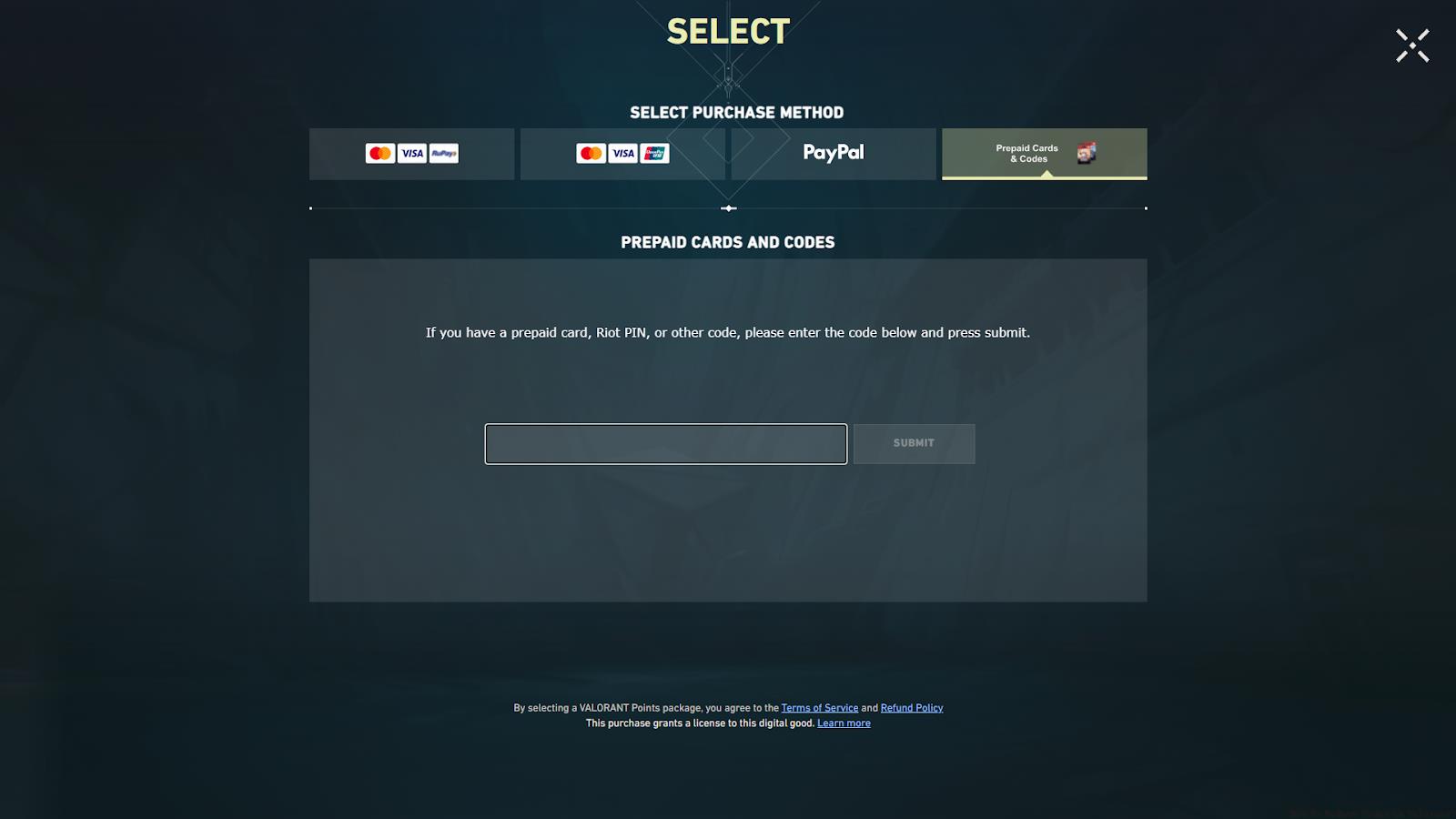
To initiate gift card redemption in Valorant, you must first acquire either physical cards from retail locations or digital codes through authorized online distributors. Both formats provide identical redemption value, though digital delivery typically offers immediate access without shipping delays.
The redemption interface remains consistently accessible through Valorant’s client interface. Follow this precise sequence for successful code application:
- Navigate to the distinctive VP icon positioned in the screen’s upper-right quadrant
- Select the ‘Prepaid Cards and Codes’ category from the payment options menu
- Accurately input your alphanumeric code in the designated text field
Following successful code submission, your Valorant Points typically populate within 2-5 minutes. The system automatically credits any bundled rewards alongside the base VP amount, though promotional items may require additional claim steps through separate notification interfaces.
Regional compatibility represents the most frequent redemption obstacle. Valorant gift cards function only within their designated geographic regions, so ensure your account region matches the card’s distribution zone. Attempting cross-region redemption triggers automatic rejection without VP distribution.
When encountering failed redemption attempts, first verify code accuracy—paying particular attention to easily confused characters like ‘0’ versus ‘O’ or ‘1’ versus ‘I’. If accuracy confirmation doesn’t resolve the issue, check your account’s transaction history for recent VP purchases, as some regions impose weekly spending limits that block additional redemptions.
Security-conscious players should exclusively purchase codes through authorized retailers. Third-party marketplaces often sell invalid or region-locked codes at suspicious discounts. For optimal account protection, enable two-factor authentication before redeeming any codes, as this adds verification layers against unauthorized access attempts.
Beyond gift cards, Valorant offers direct VP purchasing through integrated payment systems. Credit cards, PayPal, and mobile carrier billing provide instant currency allocation, though these methods lack the gifting convenience of prepaid codes. Each payment option carries distinct processing times and potential transaction fees.
Battle Pass purchases represent another VP utilization strategy, offering substantial cosmetic value through progressive unlocks. Compared to individual skin purchases, Battle Passes provide 5-8 times more cosmetic content per VP spent when completed fully, making them ideal for dedicated players seeking maximum value.
For social gifting situations, gift cards outperform direct skin purchases by allowing recipient choice flexibility. Unlike predetermined skin gifts that might not match aesthetic preferences, VP from redeemed cards lets friends select their preferred cosmetics while avoiding potential region-lock complications that sometimes affect direct cosmetic gifting between different server regions.
Action Checklist
- Verify your account region matches the gift card’s distribution zone
- Purchase gift cards only from authorized retailers to avoid fraud
- Navigate to VP icon → Prepaid Cards & Codes → Enter code precisely
- Wait 2-5 minutes for VP to appear, check transaction history if delayed
- Enable two-factor authentication for enhanced account security
No reproduction without permission:GameCDjnh » How To Redeem Codes in Valorant? Complete guide to redeeming Valorant codes with expert tips for maximizing your VP value