
TL;DR
- Proper voice communication setup can increase win rates by up to 30% in competitive matches
- Open mic eliminates push-to-talk delays, enabling faster reaction callouts during critical moments
- Optimizing audio settings reduces background noise and improves voice clarity for teammates
- Strategic callout techniques separate average players from elite communicators in ranked play
- Regular audio equipment maintenance ensures consistent communication quality across gaming sessions
When climbing Valorant’s competitive ladder, voice communication emerges as the decisive factor between victory and defeat. High-level tactical coordination transforms random teammates into cohesive units capable of executing complex strategies. Effective callouts don’t just relay enemy positions—they enable precise team rotations, synchronized site executions, and coordinated retake scenarios that overwhelm opponents.
New players often underestimate voice chat configuration, struggling with unclear audio or cumbersome push-to-talk mechanics during intense firefights. Transitioning to open mic eliminates these barriers, allowing instant communication without distracting keyboard actions. This seamless interaction becomes particularly crucial during clutch situations where milliseconds determine round outcomes.
Mastering Valorant’s audio systems represents a fundamental skill tier that separates casual participants from serious competitors. Proper configuration ensures your strategic insights reach teammates clearly and immediately.

Configuring your microphone begins with navigating Valorant’s intuitive settings interface. Follow this comprehensive setup process to ensure optimal voice communication performance throughout your gaming sessions.
- Access the settings menu by clicking the gear icon positioned in the screen’s upper-right corner from the main lobby interface
- Navigate to the Audio tab then select Voice Chat category to reveal communication options
- Verify both Input (microphone) and Output (headphones) devices display correct hardware selections matching your physical setup
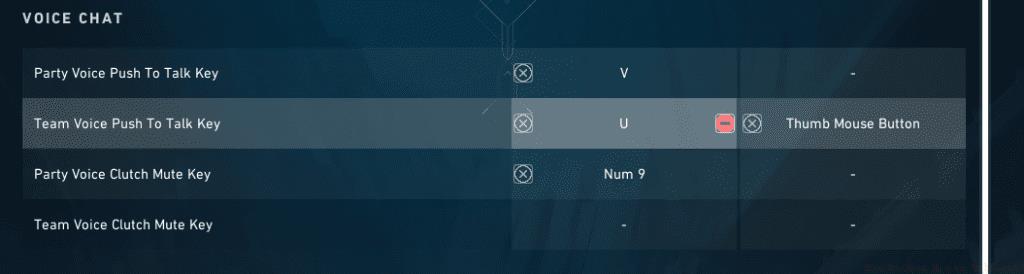
- Locate and select ‘Edit Voice Chat Key Bindings’ option at the interface bottom to configure activation methods
- Assign appropriate keyboard keys for both Team and Party communication channels based on your preference
After completing these configurations, enter any game mode and utilize your designated ‘Team Voice Push To Talk Key’ for squad-wide communications. The separate Party voice key remains available for pre-made group conversations when playing with friends. Consider binding these to easily accessible keys that don’t interfere with movement or ability usage during combat.
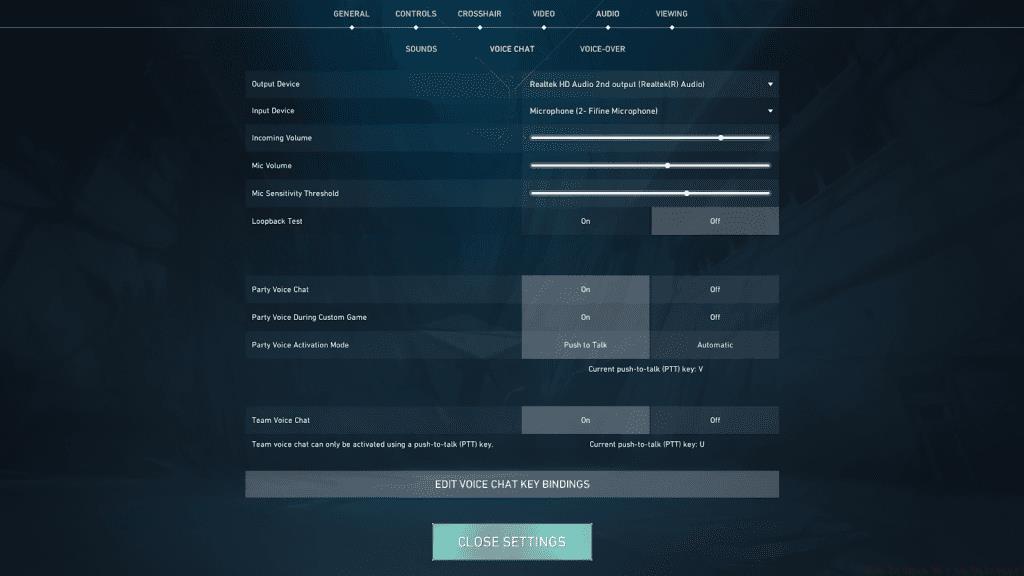
Beyond basic configuration, several optimization techniques dramatically enhance voice communication quality. Start by adjusting microphone sensitivity thresholds to activate transmission only during actual speech, preventing background noise disruption. Most gaming headsets benefit from setting the voice activation threshold between -30dB and -20dB depending on environmental conditions.
Implement noise suppression features available through both Valorant’s native settings and external software like Discord or NVIDIA Broadcast. These algorithms filter keyboard clicks, fan noises, and ambient sounds that distract teammates during critical gameplay moments. For streamers or content creators, consider dedicated noise gates through OBS or similar broadcasting software.
Regular microphone maintenance includes cleaning debris from microphone grilles, updating audio drivers monthly, and testing equipment before competitive sessions. These practices ensure consistent performance and prevent unexpected communication failures during ranked matches. For deeper audio customization, explore our Weapons Unlock guide which covers additional technical configuration strategies applicable across gaming titles.
Elite Valorant players employ specific communication methodologies that maximize information efficiency. Structure callouts using the ‘What-Where-How’ framework: identify the enemy agent, specify their exact location, and describe their current action. This eliminates ambiguous statements like “he’s over there” that confuse teammates during high-pressure situations.
Avoid common communication pitfalls including excessive chatter during execute phases, mid-round argumentation, or background noise from open microphones. These distractions compromise team focus and often lead to round losses. Instead, practice concise information delivery that prioritizes actionable intelligence over conversational dialogue.
Develop strategic communication rhythms that align with round phases: silent planning during buy periods, precise callouts during engagements, and constructive feedback during post-round analysis. This structured approach, combined with proper Class Guide team composition principles, creates synergistic team dynamics. For comprehensive gameplay improvement, reference our Complete Guide to advanced tactical coordination across multiple game genres.
Remember that effective communication extends beyond technical setup—it requires developing game sense, map knowledge, and situational awareness that transforms raw information into winning strategies.
Action Checklist
- Configure audio input/output devices in Valorant settings
- Set optimal microphone sensitivity threshold (-30dB to -20dB)
- Practice structured callout methodology in deathmatch modes
- Implement noise suppression through software solutions
- Develop team communication rhythms in unranked matches
No reproduction without permission:GameCDjnh » How To Open Mic in Valorant? Master Valorant voice communication with expert mic setup, optimization tips, and strategic callout techniques