
Complete guide to claiming free K/DA Icon Capsule through Twitch Prime Gaming with expiration alerts
K/DA’s Return and Prime Gaming Opportunity
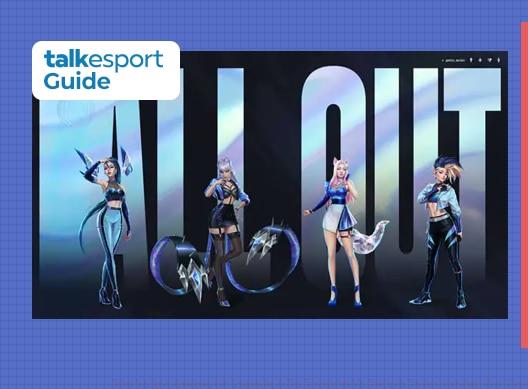
After a significant two-year hiatus, the virtual pop sensation K/DA from League of Legends has made a spectacular comeback with their “All Out” EP release on November 6th. This musical revival features collaborations with global artists including TWICE and Madison Beer, bringing fresh energy to the League universe. Riot Games has announced an exclusive giveaway program featuring specially designed K/DA themed icons, with one highlighting the newest champion addition Seraphine following her prominent role in the EP’s narrative.
The timing of this promotion aligns perfectly with K/DA’s musical resurgence, creating synergistic excitement between the game’s lore and real-world content. For dedicated League players, this represents more than just cosmetic items – it’s an opportunity to showcase allegiance to one of Runeterra’s most iconic musical groups while celebrating Seraphine’s official debut across both musical and gaming platforms.
Prerequisites for Claiming Your K/DA Loot
To access these exclusive K/DA rewards, players must meet two critical requirements: an active League of Legends account and a current Prime Gaming subscription. The subscription, previously known as Twitch Prime, provides monthly gaming benefits including in-game content across multiple titles. Before proceeding with the redemption process, verify that your Prime membership remains active and that you can successfully log into both platforms.
Many players encounter issues during the claiming process due to expired subscriptions or account verification problems. Ensure your Twitch account shows Prime status in the upper-right corner menu, and confirm your League client launches without authentication errors. These preliminary checks can save significant time and frustration when attempting to secure limited-time rewards.
Step-by-Step Account Linking Process
The foundation of claiming any Prime Gaming rewards for League of Legends begins with properly connecting your gaming account to your Twitch profile. Start by ensuring you’re logged into both your Riot Games account (through the League client or website) and your Twitch account simultaneously. Having both sessions active prevents authentication conflicts during the linking process.
- Access your Twitch account settings and navigate to the Connections tab, typically found in the left-hand navigation menu
- Scroll through the available platform connections until you locate the Riot Games option
- Select the “Connect” button adjacent to the Riot Games listing to initiate the authorization sequence
- Complete the verification prompts that appear, which may include security confirmations or permission grants
This connection establishes a secure bridge between platforms, enabling reward synchronization. Many players mistakenly attempt to claim rewards before completing this crucial step, resulting in error messages or failed redemption attempts. The connection remains persistent once established, simplifying future Prime Gaming reward claims.
Claiming Your K/DA Icon Capsule
Once your accounts are successfully linked, the reward claiming process becomes straightforward. Navigate to the official Twitch Prime Gaming website and specifically select the League of Legends section from the available games. The platform typically showcases current available rewards prominently, making the K/DA Icon Capsule easy to locate among the offerings.
- Access the League of Legends portal within the Prime Gaming website interface
- Authenticate using your Twitch credentials that maintain active Prime status
- Identify the K/DA Icon Capsule promotion and select the prominent “Claim Now” button
- Wait for the confirmation message before exiting the redemption page
Following successful claiming, immediately verify the items appear in your League inventory. Launch your game client and check the loot section to confirm the K/DA icons and accompanying Mystery Skin Shard have been properly delivered. If items don’t appear within 15 minutes, revisit the Prime Gaming page to ensure you received a confirmation message, as sometimes multiple clicks are required.
The latest @KDA_MUSIC singles have been 🔥! You can show your love for the group with the #KDA Icons exclusive with #PrimeGaming 👑
Claim your icons at the link and display it on your @LeagueofLegends account https://t.co/BobPHuRyau pic.twitter.com/vTCn19qvq6
Important Deadlines and Bonus Rewards
The K/DA Icon Capsule represents a time-sensitive opportunity with a firm expiration date of November 23rd. Unlike some Prime Gaming rewards that remain available for extended periods, this promotion aligns with the limited-time nature of K/DA’s musical event. Mark this deadline prominently in your calendar, as missed expiration dates represent the most common reason players fail to acquire limited cosmetics.
Beyond the exclusive K/DA icons, Prime subscribers receive an additional Mystery Skin Shard that can be redeemed for a random champion cosmetic. This bonus reward provides extra value beyond the promotional icons, potentially granting a premium skin for your favorite champion. Strategic players often wait to redeem these shards during events that offer bonus essence or crafting materials.
Successful claimants should explore the various K/DA icons in their collection and consider which best complements their main champion roster. The vibrant designs work particularly well with champions that share the musical theme or bright color schemes. Share your favorite acquisitions in community discussions and compare with fellow players to maximize the social aspect of these exclusive items.
Recommended: MrBeast Confirms Beast Gaming League of Legends Team
No reproduction without permission:GameCDjnh » How to get League of Legends K/DA Icons with Twitch Prime Gaming for free Complete guide to claiming free K/DA Icon Capsule through Twitch Prime Gaming with expiration alerts