
Master Valorant aiming mechanics with expert crosshair placement and sensitivity settings for competitive advantage
Advanced Crosshair Placement Techniques
Proper configuration of your gaming setup significantly impacts performance in both competitive matches and casual gameplay sessions. Optimized settings enhance enjoyment while dramatically improving shot accuracy and overall gameplay fluidity. This comprehensive guide provides foundational knowledge and advanced techniques to elevate your skills.
Crosshair configuration represents one of Valorant’s most critical gameplay elements. As a precision-focused tactical shooter, success heavily relies on target tracking consistency, recoil pattern management, and strategic crosshair positioning. The game additionally rewards players who customize ability usage to complement individual tactical approaches.
Maintaining constant environmental awareness and predicting opponent positioning separates average players from exceptional ones. Refine crosshair positioning through dedicated practice modes while mastering corner-peeking techniques. Consider reducing mouse sensitivity incrementally to enhance aiming stability during tense engagements.
Maximizing crosshair effectiveness requires careful consideration of multiple variables: reticle dimensions, color saturation, transparency levels, and mouse sensitivity calibration. Individual preferences vary significantly—some competitors thrive with minimal in-game sensitivity while others prefer heightened responsiveness for rapid flick shots.
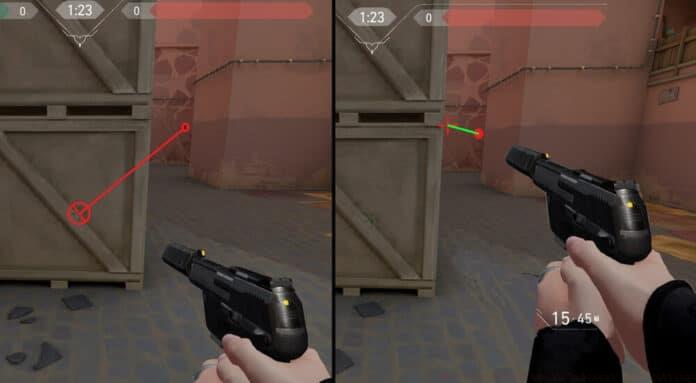
Pro Technique: Always position your crosshair at head level where enemies most frequently appear. This pre-aiming strategy reduces necessary adjustment time when targets emerge, increasing first-bullet accuracy. Practice tracing head height along common angles on each map during warm-up routines.
Common Mistake: Many beginners place crosshairs too low, requiring large upward adjustments when engaging. This delay often proves fatal in high-level play. Consciously maintain reticle positioning at average character head height (approximately 160-170cm from ground level).
Mouse Sensitivity Optimization Framework
Identifying your ideal Valorant mouse sensitivity configuration involves analyzing playstyle tendencies, hardware capabilities, and personal comfort preferences. Extensive experimentation across different sensitivity ranges helps establish your optimal performance sweet spot.
Elite Valorant competitors typically utilize effective DPI (eDPI) values spanning 0.25 through 0.70. Preferences diverge significantly—some professionals favor heightened sensitivity settings while others excel with reduced responsiveness. Novice players should initiate training with moderately elevated sensitivity for comfortable corner clearance before gradually transitioning toward lower settings as advanced techniques develop.
Valorant’s tracking-intensive gameplay mechanics mean mouse sensitivity profoundly influences movement fluidity and targeting precision. Achieving harmonious balance between sensitivity and DPI settings maximizes competitive performance potential.
During peripheral configuration, remember each mouse model features unique sensitivity characteristics and DPI capabilities. Consult manufacturer specifications through official websites for detailed technical information. Test various sensitivity configurations within Deathmatch mode to objectively measure performance impacts.
Calculation Method: Calculate your eDPI by multiplying mouse DPI by in-game sensitivity. For example, 800 DPI × 0.35 sensitivity = 280 eDPI. This standardized metric enables accurate cross-configuration comparisons.
Performance Testing: Use the Range practice mode to track target acquisition speed and accuracy across different eDPI settings. Measure headshot percentage and time-to-kill metrics to identify your personal optimal range.
Scoped Sensitivity and Precision Aiming
Selecting optimal Valorant aiming parameters proves essential for consistent shot accuracy. Multiple factors demand consideration including mouse sensitivity calibration, DPI configuration, mousepad surface area, and grip technique preferences.
Reduced sensitivity settings facilitate enhanced precision during aimed shots. This configuration improvement frequently translates to increased headshot percentages and superior target tracking consistency. Conversely, excessively high sensitivity often generates aiming inaccuracies, potentially causing missed engagements and compromised micro-adjustment capabilities.
Appropriate sensitivity selection within Valorant enhances targeting proficiency while elevating overall gaming satisfaction. These adjustments simultaneously improve mouse control mastery. Methodically fine-tune sensitivity parameters until discovering your perfect configuration.
Beyond optimal settings configuration, dedicated practice remains indispensable. Employ full arm movements for aiming rather than restrictive wrist motions. Repeatedly trace various angles and systematically practice flick-shot techniques to build muscle memory.
Operator/Odin Optimization: For sniper rifles and machine guns, consider implementing separate sensitivity profiles. Many professionals use slightly higher scoped sensitivity for quick-scoping techniques while maintaining lower settings for standard weapons.
Zoom Ratio Adjustment: Valorant allows separate sensitivity settings for different zoom levels. Typically, 0.75-0.95 zoom sensitivity works well for maintaining muscle memory across magnification levels while allowing precise micro-adjustments.
Optimal DPI Configuration Strategies
Determining perfect DPI settings for Valorant aiming configurations presents complex challenges. Multiple variables require evaluation. Select DPI that feels comfortable while providing improvement potential—especially crucial in precision-demanding gameplay environments. Consider sensitivity adjustments when experiencing performance plateaus.
Aiming proficiency represents Valorant’s most vital mechanical skill. As the game’s primary control mechanism, systematic aim practice combined with in-game training tools facilitates continuous improvement.
Most Valorant enthusiasts operate within 200-400 eDPI ranges, indicating relatively elevated sensitivity configurations. If target acquisition proves challenging, progressively reduce eDPI values. However, maintain existing settings when demonstrating consistent performance excellence.
Hardware Considerations: Modern gaming mice typically perform best at their native DPI, often 800, 1600, or 3200 DPI. Using non-native DPI can introduce interpolation, potentially reducing sensor accuracy. Test different native DPI settings with corresponding in-game sensitivity adjustments.
Sensor Performance: Higher DPI doesn’t necessarily mean better performance. Most modern sensors provide flawless tracking at 1600 DPI, while extremely high DPI (5000+) may introduce unwanted acceleration or smoothing effects that hinder precise aiming.
Crosshair Color Psychology and Visibility
Appropriate crosshair selection significantly enhances Valorant performance potential. Numerous customization options allow extensive reticle personalization. While certain colors demonstrate superior visibility, experimenting with various color codes helps identify your ideal combination.
Identify colors that create strong visual contrast against diverse map backgrounds. Green crosshairs maintain visibility against darker environments while pink variants stand out effectively in brighter settings. Exercise caution during color selection since some hues may blend disadvantageously with environmental elements.
Crosshair outlines improve enemy visibility while providing consistent reference points during aiming procedures. Adjust outline thickness and transparency according to personal preference and visual requirements.
Color Psychology: Cyan and yellow crosshairs often provide the best overall visibility across Valorant’s diverse maps. These colors rarely appear in the game’s environment, ensuring consistent contrast. Avoid red crosshairs as they can blend with enemy outline colors and blood splatter effects.
Environmental Adaptation: Create multiple crosshair profiles for different map types. Use brighter colors for dimly lit maps like Bind and Ascent, while opting for darker outlines on brightly lit environments like Breeze. This proactive adaptation ensures consistent visibility regardless of lighting conditions.
Accessibility Considerations: Players with color vision deficiencies should prioritize contrast over specific colors. Valorant’s colorblind modes can help, but choosing crosshair colors that stand out against both teams and environments remains crucial for competitive play.
No reproduction without permission:GameCDjnh » How to Get Best Aim in Valorant: Aim Settings Master Valorant aiming mechanics with expert crosshair placement and sensitivity settings for competitive advantage