
Master Valorant crosshair copying with in-game commands and code sharing for precision shooting advantage
Why Your Crosshair Matters in Valorant
A properly configured crosshair serves as your primary aiming reference in Valorant, directly influencing shot accuracy and target acquisition speed. The right crosshair design helps maintain optimal placement at head level, crucial for securing eliminations with single taps or controlled bursts. Many players underestimate how crosshair visibility affects tracking during spray patterns with automatic rifles like the Phantom and Vandal.
The Valorant community has developed an extensive library of custom crosshair configurations, ranging from professional esports settings to innovative personal creations. You can easily adopt crosshairs used by top competitive players or craft distinctive designs that match your visual preferences and gameplay approach.
During matches, you’ll frequently encounter teammates using exceptionally effective crosshair setups that catch your attention. These discoveries present perfect opportunities to instantly acquire proven configurations through Valorant’s built-in crosshair sharing system, saving you experimentation time while immediately upgrading your aiming tools.
Riot Games has implemented straightforward crosshair replication features that allow real-time configuration sharing between players. This guide covers both in-game crosshair copying and code-based importing methods to expand your aiming arsenal in 2024.
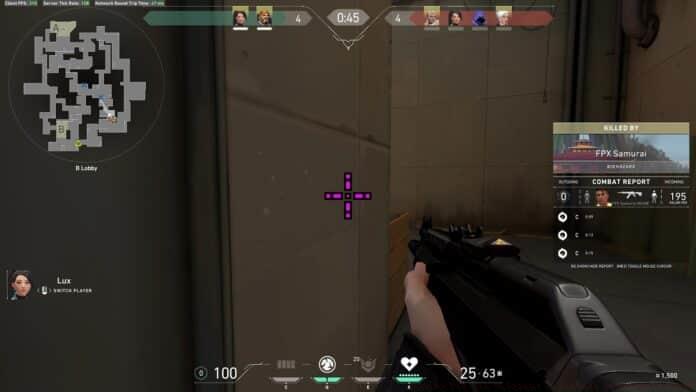
Copying Teammate Crosshairs In-Game
Valorant’s spectator-to-crosshair copying functionality operates with remarkable efficiency, typically completing in under five seconds. This immediate replication system lets you test drive promising crosshairs discovered during actual gameplay scenarios.
To duplicate a teammate’s crosshair configuration during a match:
Upon executing the command, Valorant automatically imports the spectated player’s crosshair into your profile library. The newly acquired configuration becomes immediately available for selection in your crosshair settings menu for subsequent matches. This seamless integration eliminates manual configuration work while providing authentic in-combat testing opportunities.
Strategic tip: Use death spectating periods productively by sampling different teammates’ crosshairs. This method often reveals unexpectedly effective configurations you might not have considered during manual customization. Many professional players discover their preferred setups through similar in-game experimentation.
Using Crosshair Codes for Customization
Crosshair codes provide access to virtually unlimited configuration possibilities beyond what you encounter in matches. These alphanumeric strings contain complete crosshair setting data that can be imported directly into your Valorant client.
To implement a crosshair code:
The system instantly applies all visual properties, dimensions, and behavioral settings encoded in the imported string. You can maintain multiple crosshair profiles for different agents, maps, or weapon types, switching between them as tactical situations demand.
Advanced consideration: Create specialized crosshair profiles for specific scenarios—such as long-range engagements versus close-quarters combat. Many competitive players use brighter, larger crosshairs for dark maps like Bind and more subtle designs for brighter environments like Ascent. This situational optimization can significantly improve target visibility and acquisition speed.
Advanced Crosshair Strategies
Beyond basic acquisition methods, mastering crosshair implementation requires understanding performance optimization principles. Ideal crosshairs balance visibility with minimal visual obstruction, allowing clear target acquisition while maintaining environmental awareness.
Avoid these common crosshair mistakes:
Professional players typically prefer minimalistic crosshairs—often simple dots or small crosses—that provide precise reference points without blocking visibility. Many top competitors use cyan or green colors for optimal contrast against most map textures. Testing various configurations in the Range before implementing them in competitive matches helps identify the most effective setups for your sensitivity settings and resolution.
Remember that crosshair preferences remain highly individual—what works for professional players might not suit your visual processing or aiming style. The combination of in-game copying and code importing allows efficient experimentation until you discover your personal optimal configuration.
No reproduction without permission:GameCDjnh » How to Copy Valorant Crosshair in 2024? Master Valorant crosshair copying with in-game commands and code sharing for precision shooting advantage