
TL;DR
- Use Tracker.gg for comprehensive Valorant hour tracking across all game modes
- Multiple third-party platforms offer unique stat insights beyond basic playtime
- Track performance correlation to optimize your gaming sessions effectively
- Mobile apps provide convenient real-time stat monitoring on the go
- Set realistic goals based on playtime data to improve gaming efficiency
Since Valorant launched over four years ago, dedicated players worldwide have accumulated thousands of hours mastering tactical gameplay—from intense ranked climbs to casual matches with teammates. Understanding your investment helps gauge skill progression and gaming habits.
If you regularly engage with Riot Games’ competitive shooter, you’ve likely wondered about your total playtime. While the game doesn’t include built-in hour tracking, several reliable third-party services fill this gap effectively.

Professional stat tracking platforms like Tracker.gg provide detailed analytics beyond simple hour counts, offering insights into performance trends and improvement opportunities. For comprehensive gaming strategies, check our Complete Guide to enhance your overall FPS skills.
Tracker.gg stands as the most comprehensive platform for monitoring your Valorant statistics. Begin by visiting their dedicated Valorant tracking page and entering your complete Riot ID including tagline.
Follow this optimized process for accurate results:
- Navigate to Tracker.gg’s Valorant section and input your full game ID
- Select ‘All Acts’ from the timeline filter to capture complete historical data
- Locate playtime metrics in the overview panel beneath your profile
- Toggle between Competitive, Unrated, Deathmatch, and Spike Rush tabs for mode-specific breakdowns
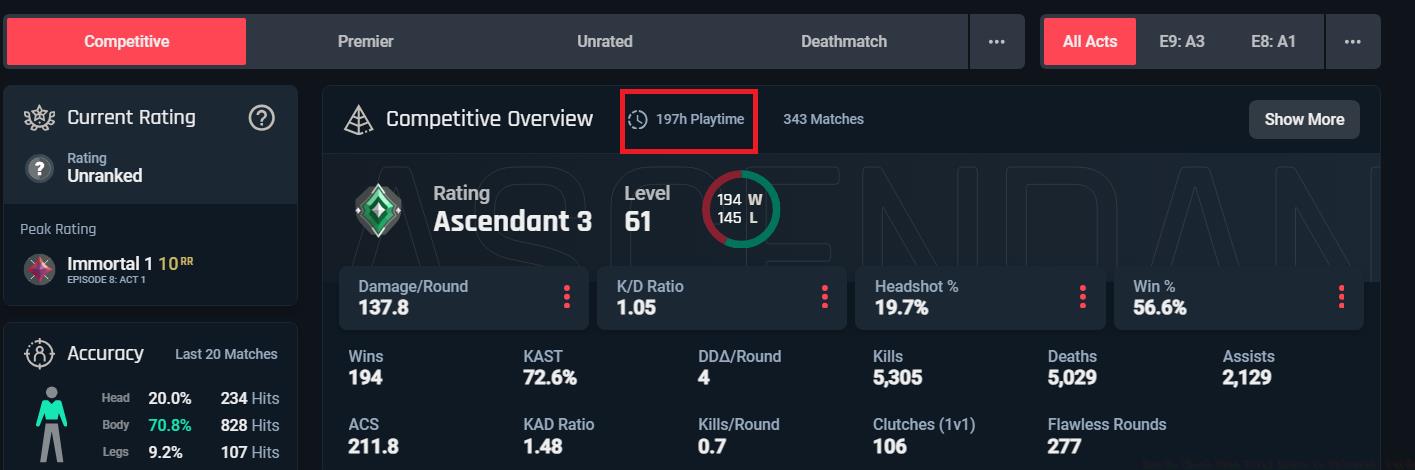
The displayed hours represent actual in-match time, excluding menus and queue periods. For weapon mastery alongside playtime tracking, explore our Weapons Unlock strategies applicable across FPS titles.
While Tracker.gg provides excellent service, several alternatives offer unique features. Blitz.gg automatically imports your gameplay data and provides personalized improvement recommendations based on playtime patterns.
VALORANTstats.xyz specializes in visual data representation, creating easy-to-understand graphs showing your hourly investment per act. This helps identify seasonal play patterns and burnout periods.
Mobile applications like Tracker Network’s companion app allow real-time stat checking from your phone, perfect for quick updates between matches. These tools sync seamlessly with your existing accounts without additional setup.
Each platform calculates hours slightly differently—some include practice range time while others focus exclusively on match duration. Consistent use of one service provides the most accurate longitudinal data for tracking improvement.
Beyond simply counting hours, sophisticated analysis reveals performance correlations. Many players discover their win rates peak during specific daily time blocks, indicating optimal focus periods.
Common tracking mistakes include inconsistent platform use and ignoring mode-specific data. For balanced skill development, ensure your playtime distribution across Competitive, Unrated, and Deathmatch aligns with improvement goals.
Advanced optimization involves setting session time limits to maintain peak performance and prevent fatigue-induced skill decline. Most professional players recommend 3-4 hour sessions with mandatory breaks.
Correlate your playtime with rank progression in our Class Guide to understand how different agent roles impact improvement rates. Consistent tracking transforms raw hours into actionable improvement strategies.
Action Checklist
- Choose primary tracking platform (Tracker.gg recommended)
- Input complete Riot ID with tagline for accurate data
- Review mode-specific hours and identify play patterns
- Set improvement goals based on playtime-to-rank correlation
- Install mobile companion app for regular progress monitoring
No reproduction without permission:GameCDjnh » How To Check Your Total Hours in Valorant: Guide Discover multiple methods to track your Valorant playtime with detailed stats and optimization tips