
TL;DR
- EaglerCraft delivers full Minecraft 1.5.2/1.8.8 gameplay directly in web browsers without downloads
- Created by developer LAX1DUDE using JavaScript and HTML5 for maximum accessibility
- Optimized for school Chromebooks and low-spec devices with specific performance tweaks
- Includes both singleplayer and multiplayer modes with seamless cross-platform compatibility
- Free-to-play alternative that preserves core Minecraft mechanics while adding browser convenience
EaglerCraft represents an innovative web-optimized adaptation of Minecraft that enables immediate gameplay through standard internet browsers without requiring software installation. This JavaScript-powered voxel adventure game utilizes Ahead-of-Time compilation technology to deliver surprisingly robust performance directly within your browser environment. The platform’s architecture ensures compatibility across diverse operating systems and devices, making block-based exploration accessible to virtually anyone with internet access.
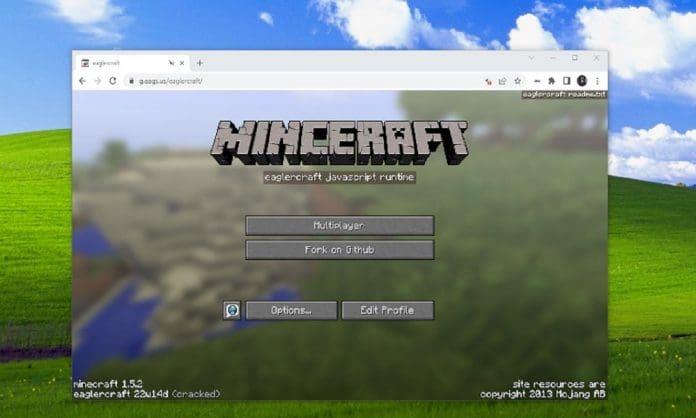
Unlike traditional Minecraft requiring Java runtime installation, EaglerCraft leverages modern web technologies to eliminate dependency conflicts and simplify the entry process for new players. The game maintains the essential sandbox experience Minecraft fans expect while introducing browser-specific optimizations that enhance loading speeds and reduce system resource consumption. This approach makes it particularly valuable for educational environments and low-specification devices where conventional gaming installations face limitations.
The creation of EaglerCraft stems from developer LAX1DUDE’s vision to democratize Minecraft accessibility through web browser technology. By harnessing JavaScript and HTML5 capabilities, the initial multiplayer-only version built upon Minecraft 1.5.2 demonstrated that browser-based gaming could deliver authentic block-world experiences. This proof-of-concept quickly garnered attention within the Minecraft community, validating the technical approach and inspiring further development.
Building upon this foundation, EaglerCraftX emerged as an enhanced iteration utilizing Minecraft 1.8.8 as its base, incorporating significant performance improvements and expanded feature sets. The progression between versions illustrates a deliberate development philosophy focused on balancing authenticity with technological innovation. For players interested in similar strategic gaming experiences, our Complete Guide explores how modern games approach version evolution and feature implementation.
Understanding this developmental trajectory helps players appreciate the technical achievements underlying EaglerCraft’s browser compatibility. The transition from initial concept to refined product demonstrates how open-source gaming projects can successfully adapt beloved titles for emerging platforms while maintaining core gameplay integrity that resonates with veteran Minecraft enthusiasts.
EaglerCraft faithfully recreates the fundamental Minecraft experience while implementing browser-specific optimizations that distinguish it from the original Java edition. Players encounter familiar mechanics including mining, crafting, building, and exploration within a voxel-based environment that captures the essence of classic Minecraft. The preservation of core gameplay loops ensures that skills developed in EaglerCraft translate directly to other Minecraft versions.
Performance-wise, EaglerCraft demonstrates remarkable efficiency on hardware-constrained devices like school Chromebooks, where traditional gaming applications often struggle. The browser-based execution environment eliminates installation barriers and simplifies updates, though players should note some visual fidelity compromises compared to native installations. Just as strategic Class Guide selection enhances battlefield effectiveness in other games, understanding EaglerCraft’s performance characteristics helps maximize enjoyment.
The game’s compatibility extends beyond Chromebooks to include most modern browsers supporting JavaScript, though performance varies based on device capabilities and browser optimization. Mobile browser support remains limited compared to desktop experiences, reflecting technical constraints of touch-based interfaces with complex control schemes originally designed for keyboard and mouse input.
Maximizing your EaglerCraft experience requires understanding both its capabilities and limitations. For optimal performance, ensure your browser is updated to the latest version and consider using performance-focused browsers like Chrome or Firefox. Disabling unnecessary browser extensions can significantly improve frame rates, particularly on lower-end devices. Additionally, adjusting render distance settings provides immediate performance benefits without substantially impacting gameplay quality.
Common installation misconceptions often cause frustration among new players. Unlike traditional games, EaglerCraft requires no Java installation despite its Minecraft foundations—the game runs entirely through JavaScript interpretation. Connection issues typically stem from browser security settings blocking required resources rather than game server problems. Understanding these distinctions helps troubleshoot more effectively when encountering access difficulties.
For players seeking to enhance their strategic approach, similar to optimizing Weapons Unlock progression in other games, EaglerCraft benefits from understanding its specific mechanics. World generation follows predictable patterns that experienced players can leverage for efficient resource gathering. Multiplayer sessions perform best with smaller player counts due to browser processing limitations, making focused cooperative projects more viable than massive servers with dozens of simultaneous participants.
Action Checklist
- Verify browser compatibility and update to latest version
- Disable unnecessary browser extensions for performance boost
- Adjust in-game render distance based on device capabilities
- Configure browser security settings to allow game resources
- Optimize multiplayer sessions by limiting player count
No reproduction without permission:GameCDjnh » EaglerCraft: A Free-to-Play Minecraft Experience Explained Complete guide to EaglerCraft: Browser-based Minecraft alternative with expert tips and strategies