
Complete ZywOo CSGO setup guide with pro optimization tips and actionable checklist for competitive gaming
Introduction: ZywOo’s Rise to CSGO Dominance
The competition for 2020’s top CSGO professional generated intense discussion throughout the gaming community. After HLTV’s official announcement confirmed French prodigy Mathieu “ZywOo” Herbaut as the world’s premier Counter-Strike player, the ongoing debate reached its conclusive resolution.
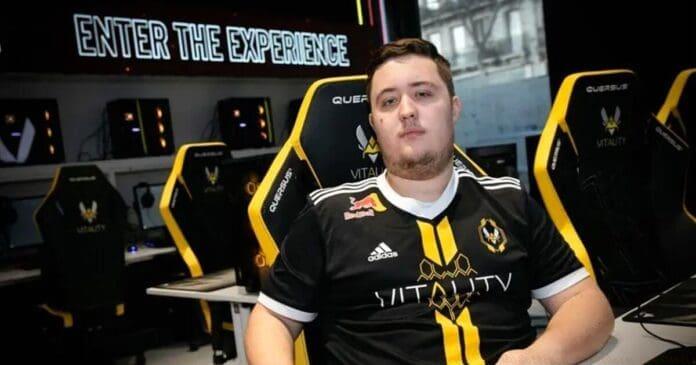
At just twenty years old, this remarkable talent established himself as Vitality’s cornerstone player, excelling as both a primary rifler and AWPer. ZywOo’s extraordinary performances during the second half of 2020 propelled his team to numerous critical victories. Maintaining exceptional consistency throughout the competitive season, his impressive 1.38 impact rating narrowly surpassed the 1.37 rating of world number two player s1mple.
This comprehensive examination explores ZywOo’s complete CSGO configuration and gaming equipment that supported his championship-caliber performance throughout 2020, ultimately securing his position as the game’s best competitor.
Monitor: BenQ XL2546 – Competitive Edge Display
The BenQ XL2546 represents the gold standard for competitive gaming displays, featuring 240Hz refresh rate technology that provides exceptionally smooth visual feedback. This monitor’s DyAc (Dynamic Accuracy) technology minimizes motion blur during rapid aim adjustments, giving players like ZywOo clearer target tracking during intense firefights.
Professional gamers consistently choose the XL2546 for its Black eQualizer feature, which enhances visibility in darker areas without overexposing brighter sections. This capability proves crucial for spotting enemies hiding in shadows or dimly lit corners of popular competitive maps.
For optimal performance, set the refresh rate to 240Hz in both Windows display settings and your GPU control panel. Combine this with the monitor’s FPS mode preset and adjust Black eQualizer to level 10-12 for balanced visibility across all lighting conditions.
Mouse: VAXEE Zygen NP-01 Glossy – Precision Control
VAXEE’s NP-01 Glossy edition provides the exceptional grip and control that ZywOo relies on for his precise aiming. The glossy coating offers superior traction for players with drier hands, ensuring consistent control during high-pressure situations. This mouse features the PMW3389 sensor, delivering flawless tracking with zero acceleration or smoothing at competitive DPI settings.
The NP-01’s unique shape bridges the gap between ergonomic and ambidextrous designs, accommodating various grip styles while promoting natural wrist alignment. ZywOo reportedly uses 400 DPI with this mouse, a common preference among professionals for its balance of precision and sweeping motion control.
When configuring your NP-01, disable any acceleration in both the mouse software and Windows settings. Experiment with grip tape if you experience slippage during extended sessions, and consider pairing it with a control-oriented mousepad for optimal stopping power.
Crosshair Settings – Precision Targeting System
ZywOo’s crosshair configuration prioritizes visibility and target acquisition speed without creating visual distraction. His preferred settings typically feature a small green crosshair with minimal gap and outline, providing clear reference points for head-level aiming while maintaining peripheral awareness.
For optimal crosshair effectiveness, avoid overly thick lines that can obscure small targets at long distances. Instead, use a 1-2 pixel thickness with a subtle outline to maintain visibility across different map backgrounds. The color green offers excellent contrast against most environments while remaining easy on the eyes during extended play sessions.
Common mistakes include using crosshairs that are too large or brightly colored, causing visual fatigue and reduced focus on enemy movement. Test your crosshair in various lighting conditions and adjust accordingly based on personal visual acuity and monitor characteristics.
Viewmodel Configuration – Optimal Weapon Positioning
Viewmodel settings significantly impact both visual comfort and practical gameplay effectiveness. ZywOo’s configuration positions weapons to maximize screen real estate while maintaining clear visibility of weapon animations and spray patterns.
Optimal viewmodel placement keeps your weapon minimally obstructive while providing necessary visual feedback for recoil control. Many professionals prefer positioning their viewmodel slightly to the left (for right-handed models) to create cleaner sightlines on the dominant peeking side.
Advanced players should experiment with custom viewmodel values to find the perfect balance between visibility and immersion. Avoid extreme positions that make weapon animations difficult to read or create unusual perspective distortions during movement.
Video Settings – Performance Optimization
Competitive video settings prioritize frame rate stability and visual clarity over aesthetic quality. ZywOo’s configuration typically uses low to medium settings across most options to maximize FPS while maintaining sufficient visual information for competitive play.
Critical settings include disabling anti-aliasing and post-processing effects that can introduce input lag or visual distortion. Multisampling anti-aliasing can create slight mouse latency, while motion blur objectively hinders target tracking precision during rapid camera movements.
For advanced optimization, ensure your NVIDIA Control Panel settings align with in-game configurations. Set maximum pre-rendered frames to 1, enable low latency mode, and disable vertical sync completely to minimize system latency between your inputs and on-screen actions.
PC Setup – High-Performance Gaming Rig
ZywOo’s powerful gaming system centers around the Intel Core i9-9900K processor, providing exceptional single-thread performance crucial for CSGO’s engine optimization. Paired with the NVIDIA GeForce RTX 2080 Ti graphics card, this combination delivers consistently high frame rates even during graphically intensive situations.
The complete peripheral setup includes:
CPU – Intel Core i9-9900K
GPU – Nvidia GeForce RTX 2080 Ti
Mousepad – Corsair MM200 Pro
Keyboard – Corsair K70 RGB MK.2 SE
Headset – Corsair Void RGB Elite Wireless
For optimal performance, ensure your system maintains stable temperatures through proper cooling solutions. Overheating can cause thermal throttling that introduces inconsistent frame pacing, negatively impacting aim consistency. Regularly update drivers and monitor system performance to identify potential bottlenecks.
Also Read | EA to launch FIFA 21 for Google Stadia in March
Professional Strategies and Common Mistakes
Beyond hardware configuration, ZywOo’s success stems from disciplined practice routines and strategic decision-making. Elite players focus on consistent crosshair placement at head level, minimizing the distance their mouse must travel to acquire targets. This fundamental technique separates professional play from amateur competitors.
Common mistakes include over-adjusting settings too frequently rather than developing muscle memory with a stable configuration. While minor tweaks can help, constantly changing sensitivity, resolution, or crosshair settings prevents the development of consistent aim mechanics.
Advanced optimization involves analyzing your own gameplay to identify specific weaknesses. Use demo reviews to spot patterns in missed shots or positional errors, then create targeted training routines to address these issues. Professional players often dedicate specific practice sessions to individual skills like flick shots, tracking, or spray control.
No reproduction without permission:GameCDjnh » ZywOo’s CSGO Settings, Crosshair, And Config Complete ZywOo CSGO setup guide with pro optimization tips and actionable checklist for competitive gaming