
Master hat customization in Pokémon Scarlet and Violet with expert styling tips and character optimization strategies
Introduction to Pokémon Scarlet and Violet’s Open World
Pokémon Scarlet and Violet represent a significant evolution in the beloved franchise, introducing players to the expansive Paldea region through groundbreaking open-world gameplay mechanics. Developed by Game Freak and released in November 2022, these ninth-generation titles broke Nintendo sales records by moving over 10 million units within just three days of launch.
The Paldea setting, inspired by the Iberian Peninsula’s diverse landscapes, offers three distinct story paths that players can explore simultaneously. This non-linear approach to storytelling represents a major departure from traditional Pokémon games, providing unprecedented freedom in how trainers experience their adventure.
Character personalization has become increasingly important in modern Pokémon games, with Scarlet and Violet offering extensive customization options that allow players to express their unique style throughout their journey across Paldea.
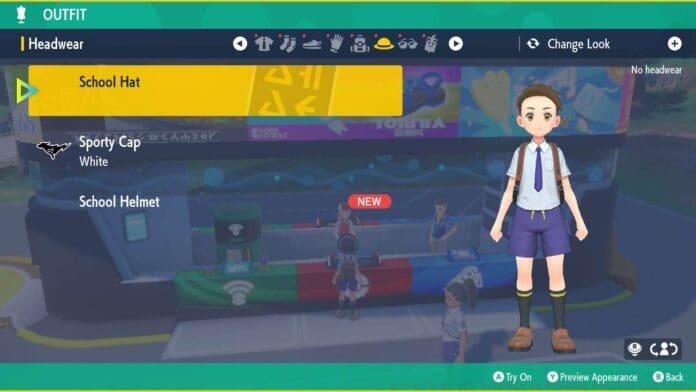
Complete Hat Removal Guide
The Appearance Menu serves as your central hub for character customization, accessible at any time during gameplay. This feature allows for real-time changes to your trainer’s appearance without interrupting your adventure through Paldea’s diverse environments.
To begin customizing your headwear, press the Left directional pad button to open the Appearance Menu interface. This quick-access feature ensures you can make style adjustments on the fly, whether you’re exploring cities or traversing wilderness areas.
Within the menu system, use your joystick or directional pad to navigate to the Hat category section. Here you’ll find all available headwear options organized by type and style, including the default School Hat, Sport Cap variations, and specialized headgear.
- Press the Left directional pad button to access the Appearance Menu
- Use the Joystick or Directional Pad to navigate to the Hat category
- Navigate to the Hat you currently have equipped in the list (denoted by the green check mark)
- Press the X button to take off your hat
- Press the B button to return to the game
Locate your currently equipped hat indicated by the distinctive green checkmark symbol. Pressing the X button will remove the hat entirely, revealing your character’s complete hairstyle. The B button confirms your selection and returns you to gameplay with your new look immediately applied.
Advanced Customization Strategies
Removing your hat provides the perfect opportunity to showcase the extensive hairstyle options available in Scarlet and Violet. The games feature numerous haircuts, colors, and accessories that become more visible without headwear obstruction.
Strategic hat removal can significantly enhance your character’s overall aesthetic. Consider removing hats during cutscenes or important story moments to create more personal and memorable interactions with NPCs and legendary Pokémon.
Advanced players often create multiple outfit presets that include both hat and no-hat configurations. This allows for quick style changes based on in-game activities – keeping hats for athletic challenges while going hatless for formal occasions or photography sessions.
Coordinate your hat choices with environmental factors within Paldea. Some players prefer hatless appearances in indoor settings or during rainy weather, while utilizing headwear for sun protection in desert areas or mountain expeditions.
Pro Tips and Common Mistakes
Many new players overlook the importance of regularly updating their appearance settings. Your character’s look should evolve throughout your journey, reflecting your progression as a Pokémon trainer.
A common mistake involves forgetting that hat removal is separate from overall outfit changes. You can maintain your current clothing configuration while simply removing headwear, allowing for subtle style adjustments without complete wardrobe overhauls.
Optimization tip: Use the Appearance Menu during loading screens or while riding Miraidon/Koraidon to maximize gameplay efficiency. This ensures you spend more time exploring and battling rather than navigating menus.
Advanced technique: Combine hat removal with specific emote animations to create unique social interactions during multiplayer sessions. Certain expressions and gestures appear more natural and expressive without headwear obstruction.
Remember that some special events or locations may automatically equip specific headwear. Always check your appearance after completing storyline segments or participating in tournaments to ensure your preferred style is maintained.
No reproduction without permission:GameCDjnh » How to Take Off Your Hat in Pokémon Scarlet and Violet Master hat customization in Pokémon Scarlet and Violet with expert styling tips and character optimization strategies