
TL;DR
- Diagnose network stability through speed tests and router resets before troubleshooting game issues
- Always verify game version compatibility and perform clean installations when connection problems persist
- Configure DNS settings and firewall exceptions to eliminate network-level connection barriers
- Monitor server status and select optimal regional servers for improved connectivity
- Implement preventive maintenance routines to avoid recurring connection disruptions
League of Legends: Wild Rift represents Riot Games’ acclaimed mobile adaptation of their legendary battle arena franchise, delivering intense 5v5 competitive gameplay. Numerous gamers have encountered the frustrating ‘Unable to Connect to Server’ notification that appears during game launch sequences. This critical error completely prevents access to online features since Wild Rift operates exclusively through persistent server connectivity rather than supporting offline functionality.
Experiencing persistent server connection failures in Wild Rift? This comprehensive guide delivers systematic solutions to restore your gaming access immediately. Continue reading to implement proven troubleshooting methodologies that address both common and complex connectivity obstacles.
Multiple technical factors can trigger server connection failures in mobile gaming environments. We’ll examine these contributing elements through detailed diagnostic procedures and resolution pathways.

Unstable internet connectivity represents the predominant cause of server connection failures. Conduct comprehensive network assessment by performing speed tests through services like Speedtest.net, ensuring minimum 5 Mbps download and 2 Mbps upload speeds for stable gameplay. Examine signal strength indicators on your device and consider proximity to routers or access points.
Execute router revitalization by disconnecting power completely for 30 seconds before reconnecting, allowing full configuration reload. For mobile data users, toggle airplane mode for 15 seconds to refresh cellular connections. Additionally, inspect background applications that might consume bandwidth excessively during gaming sessions.
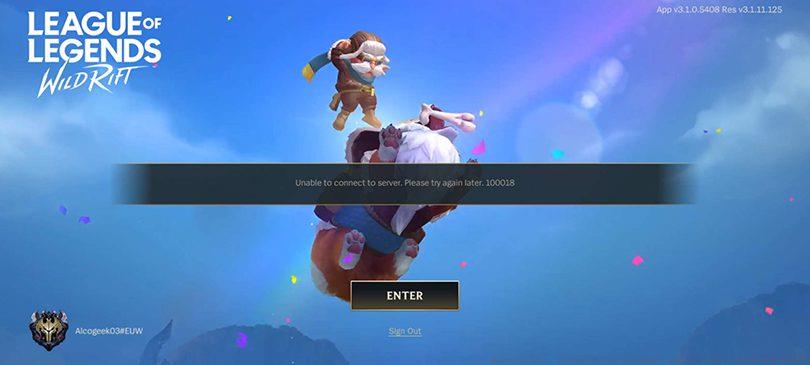
Advanced network configuration involves port forwarding for Wild Rift’s specific requirements (typically ports 5223, 8088, and 443) and verifying NAT type compatibility. Wireless users should consider Ethernet connections for critical gaming sessions to eliminate Wi-Fi instability variables.
Outdated game versions frequently cause server rejection due to version mismatch protocols. Validate your current Wild Rift build through the game’s settings menu under ‘About’ section, comparing it against official patch notes from Riot Games. Update procedures differ between platforms: Android users should access Google Play Store while iOS players utilize App Store, searching explicitly for Wild Rift then initiating download sequences.
When persistent connection errors survive update attempts, implement complete application reinstallation. This process resolves corrupted local files and registry entries that might interfere with authentication processes. Before reinstalling, ensure account credentials are securely documented to prevent access loss. After fresh installation, allow all asset downloads to complete fully before attempting server connection.
Consider clearing game cache and data through device settings as intermediate step between updating and full reinstallation. This preserves account information while removing potentially corrupted temporary files affecting connectivity.
Domain Name System configuration significantly impacts connection reliability. Replace default ISP DNS with optimized alternatives like Google DNS (8.8.8.8, 8.8.4.4) or Cloudflare DNS (1.1.1.1) for improved resolution accuracy. Network administrators should verify firewall exceptions for Wild Rift executables and ensure security software isn’t incorrectly flagging game traffic.
Regional server selection influences connection quality dramatically. Assess current server load through official status pages and consider switching regions during maintenance periods. VPN services can sometimes bypass regional restrictions but may violate terms of service—evaluate risks before implementation.
For advanced users, conduct traceroute analyses to identify specific network hops causing packet loss. Monitor for Internet Service Provider throttling during peak hours and consider Quality of Service (QoS) configurations to prioritize gaming traffic on home networks.
Implement proactive maintenance schedules including regular game updates before gaming sessions and periodic network equipment reboots. Establish connection quality benchmarks and monitor for degradation patterns that might indicate impending failures. For competitive players, maintain backup internet options like mobile hotspots for critical matches.
Network optimization extends beyond basic troubleshooting—configure gaming-specific router settings when available, prioritize wired connections, and schedule downloads during off-peak hours. Monitor Riot Games’ official communications for scheduled maintenance windows that might temporarily affect connectivity.
Understanding these comprehensive troubleshooting approaches ensures minimal downtime and optimal gaming performance. For broader gaming strategies beyond connectivity issues, explore our Complete Guide to master other competitive titles.
Action Checklist
- Perform internet speed test and router reset
- Verify game version and update through official stores
- Clear game cache and data through device settings
- Configure optimized DNS settings and firewall exceptions
- Perform clean reinstallation if errors persist
No reproduction without permission:GameCDjnh » How to Fix “Unable to Connect to Server” in Wild Rift? Comprehensive troubleshooting guide for Wild Rift server connection issues with advanced network optimization techniques