
TL;DR
- ARRT0003 indicates server connectivity issues that can cause gear loss during disconnects
- Always verify server status first using official Discord or third-party monitoring tools
- Perform comprehensive network diagnostics including router resets and connection testing
- Validate game file integrity through Steam’s verification system for corrupted data
- Implement preventive measures to minimize future connection disruptions
When diving into Arc Raiders gameplay, few issues prove more disruptive than the ARRT0003 connectivity error that interrupts your gaming sessions unexpectedly.
The ARRT0003 “Online Connection Error” frequently emerges during critical raid moments, completely blocking access to Arc Raiders servers. This connectivity failure can result in significant gear loss if extraction occurs before reconnection, leaving players frustrated and disadvantaged.
If you’re experiencing the notorious ARRT0003 error in Arc Raiders, rest assured this widespread issue affects numerous players. Recent community reports indicate frequent occurrences during matchmaking attempts, with many users documenting substantial equipment losses due to abrupt disconnections.
Fortunately, systematic troubleshooting typically resolves ARRT0003 errors through methodical problem-solving approaches that address underlying connectivity problems.
As previously noted, Arc Raiders ARRT0003 errors primarily stem from communication breakdowns between your game client and the live service infrastructure.
Let’s examine comprehensive resolution strategies for this persistent connectivity challenge:

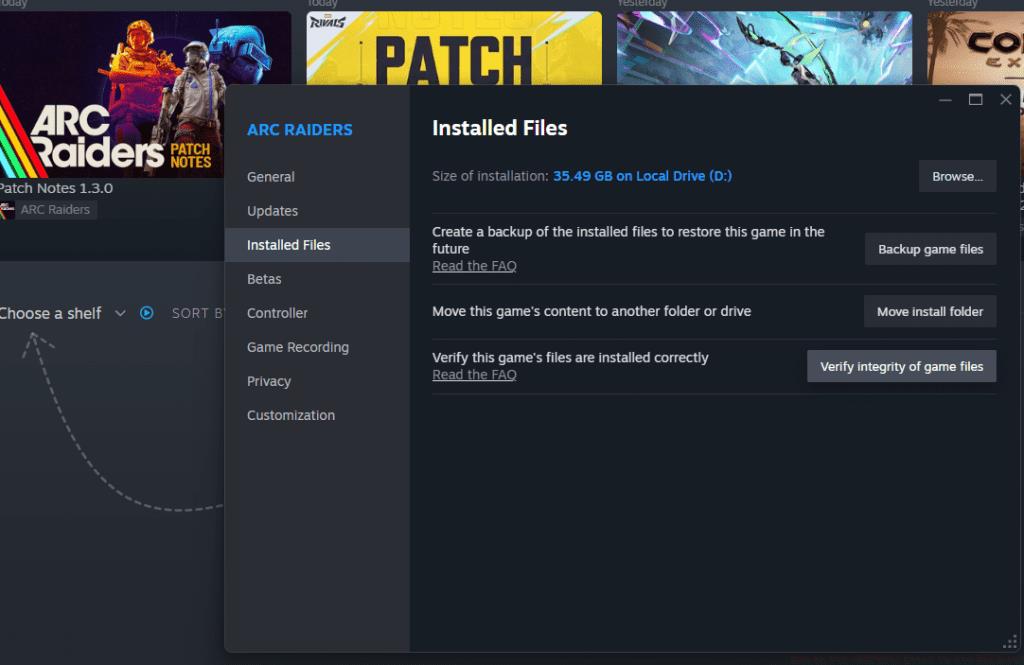
Anticipate extended verification durations depending on your hardware capabilities. Following successful file validation, game access typically restores normally. For persistent problems, consider consulting our Class Guide for additional system optimization strategies that improve overall gaming performance.

Advanced Troubleshooting: For recurring ARRT0003 errors, examine firewall and antivirus settings that might block game connections. Additionally, consider DNS changes to 1.1.1.1 or 8.8.8.8 for improved routing. Monitor network latency during gameplay and avoid bandwidth-intensive activities during raids to maintain stable connections.
Prevention Strategies: Regularly update network drivers and game clients, maintain system cleanliness from malware, and consider Ethernet over wireless for critical gaming sessions. These proactive measures significantly reduce ARRT0003 occurrence frequency and protect your hard-earned gear from connection-based losses.
Action Checklist
- Check Arc Raiders server status via official Discord or Downdetector
- Power cycle router and modem with 30-second wait period
- Verify game file integrity through Steam client
- Review firewall and antivirus settings for game exceptions
- Implement preventive network optimization measures
No reproduction without permission:GameCDjnh » How to Fix ARRT0003 Error in Arc Raiders? Comprehensive troubleshooting guide for Arc Raiders ARRT0003 connection error with advanced diagnostic techniques