
A comprehensive guide to Lightgleaner’s Journey Day 5 with advanced positioning tips, common mistake avoidance, and reward optimization strategies.
Event Overview & Rewards
Day 5 of Genshin Impact’s Lightgleaner’s Journey photography event presents a creative challenge in Nasha Town. Your objective is to capture three specific scenes featuring robots that appear to be performing actions, purely through clever camera angle manipulation with your Memento Kamera. This event tests your observational skills and understanding of perspective rather than combat abilities.
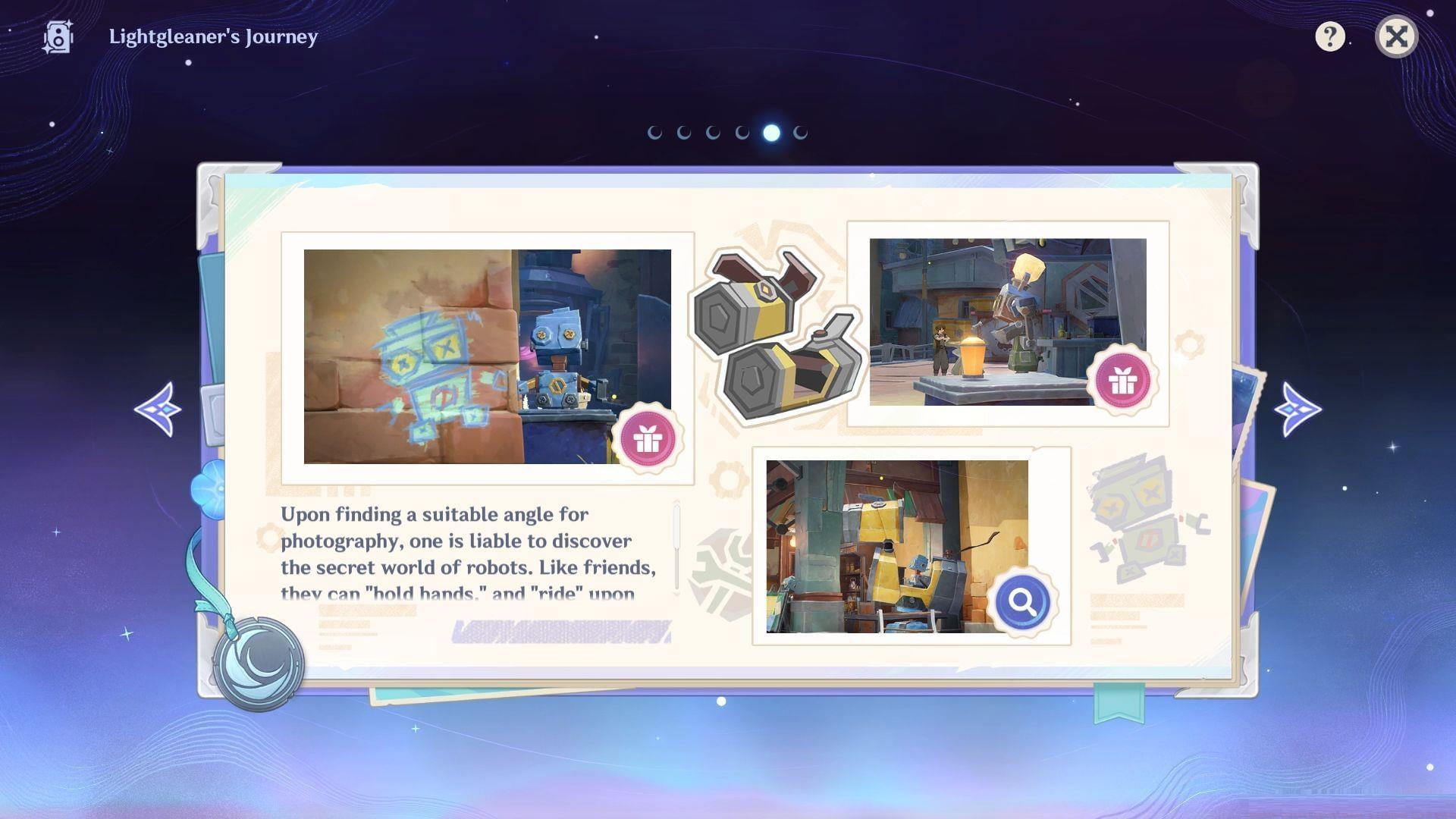
Successfully completing all three photography challenges unlocks valuable in-game resources. These include Primogems for wishes, character talent level-up materials to enhance abilities, Mora for upgrades and purchases, and weapon ascension materials to strengthen your arsenal. The event offers a efficient reward-to-time ratio compared to typical domain farming.
Pro Tip: Activate the event through the Events menu first, then equip your Memento Kamera from the Gadgets inventory. Many players forget this step and waste time trying to activate the camera without proper event initialization.
Photo Challenge 1: Holding Hands
The first composition requires creating the illusion that the robot decoration on a wooden box is holding hands with the robot graffiti painted on a nearby wall. This challenge is located in Nasha Town’s central market area.
Execution Steps:
- Identify the two NPCs mentioned in the event description – they serve as your positioning landmarks
- Stand approximately 3-4 character steps away from these NPCs, facing the box robot
- Activate your Memento Kamera (default key ‘Z’ on PC) while maintaining this position
- Slowly pan downward and slightly left until the box robot and wall graffiti align visually
- The perfect angle typically requires crouching (Ctrl on PC) for optimal perspective
Common Mistakes to Avoid:
- Wrong activation order: Don’t adjust angle first, then activate camera – this resets positioning
- Too close/too far: Being either extreme prevents the visual alignment from working
- Ignoring NPC markers: The NPCs aren’t just flavor – they’re precise distance indicators
Upon successful capture, you’ll immediately receive: Primogems ×20, Mora ×20,000, and character talent materials. These rewards appear directly in your inventory without additional claiming steps.
Photo Challenge 2: Riding the Metal Horse
Your second target creates the whimsical scene of a store counter robot appearing to ride the decorative metal horse statue. This location is conveniently near your first challenge spot, allowing for efficient routing.
Optimal Positioning Strategy:
- Move to the metal horse’s right side (facing the same direction the horse faces)
- Position your character so the store counter robot is visible over the horse’s back
- Activate the Memento Kamera while maintaining this lateral alignment
- Adjust vertically until the robot appears centered on the horse’s back
- The sweet spot typically requires moving slightly backward after activation
Advanced Technique: Wait for any NPCs to clear the immediate area. Sometimes wandering NPCs can block the sightline or create visual clutter that confuses the angle detection system. Patience here saves retry attempts.
Successful completion grants: Afterglow of the Long Night Flint ×2 (weapon ascension material) and additional Mora. These materials are particularly valuable for leveling Fontaine-era weapons.
Photo Challenge 3: Robot Having a Drink
The final composition stages a robot at a crafting table appearing to enjoy a beverage. This challenge is located near the Adventurers’ Guild, with street vendor Cairuo serving as your primary reference point.
Precision Alignment Method:
- Stand directly in front of Cairuo, facing the crafting table robot
- Align yourself so Cairuo is perfectly between you and the target robot
- Activate the Memento Kamera without moving from this alignment
- Tilt the camera downward approximately 30 degrees
- The robot should now appear to be “holding” a drink from the table items
Lighting Consideration: Time of day affects this shot. If the scene appears too dark or shadowed, consider adjusting your in-game clock to midday (12:00) via the Paimon Menu for optimal visibility. The event works at any time, but lighting helps with angle verification.
Why This Angle Works: The crafting table contains bottle assets that, when viewed from this specific perspective, align with the robot’s position to create the drinking illusion. Understanding this environmental storytelling helps replicate the shot reliably.
Your reward for this creative capture: Mystic Enhancement Ore ×5 for weapon enhancement and a final bundle of Mora. This completes the day’s event rewards.
Also read: Genshin Impact Miliastra Wonderland – Everything you need to know
Pro Strategies & Optimization
Maximize your efficiency and avoid frustration with these advanced strategies developed through event testing.
Optimal Route Planning:
- Start at Challenge 1 (central market) – complete holding hands illusion
- Walk directly northwest to Challenge 2 (metal horse) – 15 seconds travel
- Finally teleport to Adventurers’ Guild waypoint for Challenge 3 – instant access
- Total completion time: 7-10 minutes for experienced players
Reward Maximization Tips:
- Complete all three challenges in one session – rewards are cumulative
- Use the opportunity to also complete daily commissions in Nasha Town
- The Mora reward is substantial enough to delay your usual Mora farming
- Primogems automatically add to your total without inventory management
Troubleshooting Common Issues:
- Camera won’t activate: Verify event is active in Events menu
- Angle not registering: Try slight micro-adjustments rather than large sweeps
- Rewards not appearing: Check inventory directly; no notification sometimes appears
- NPCs in the way: Wait 10-15 seconds or switch to another challenge temporarily
Follow Sportskeeda for more Genshin Impact updates and guides covering both events and character build optimization.
No reproduction without permission:GameCDjnh » Genshin Impact Lightgleaner’s Journey Day 5 guide A comprehensive guide to Lightgleaner's Journey Day 5 with advanced positioning tips, common mistake avoidance, and reward optimization strategies.