
Complete guide to COD: Mobile Pawn Takes Pawn event with step-by-step walkthrough and pro tips
Understanding the Pawn Takes Pawn Event
Call of Duty: Mobile Season 11 launched on October 12, introducing numerous fresh content additions, gameplay features, and limited-time events. The standout Pawn Takes Pawn special event provides players with complimentary rewards through redeemable codes that are remarkably straightforward to claim.
Pawn Takes Pawn originated as an interactive viral website that formed part of an Alternate Reality Game (ARG) campaign preceding the announcement of Call of Duty: Black Ops Cold War. This innovative marketing strategy bridged multiple gaming platforms to create an immersive pre-launch experience.
The extensive ARG network spanned across Call of Duty: Black Ops 4, Call of Duty: Warzone, and Call of Duty: Mobile, creating a cohesive narrative experience for dedicated franchise fans.
Following the substantial Season 11 update, COD: Mobile introduced its major anniversary celebration event, with subsequent smaller events like Pawn Takes Pawn enhancing the ongoing content cycle. This strategic event rollout maintains player engagement throughout the season.
The Pawn Takes Pawn event enables participants to earn valuable rewards by accomplishing specific objectives within a newly implemented bunker-style environment. Players can access this specialized area through the events interface, where a sequence of interactive tasks awaits completion.
Step-by-Step Walkthrough: Accessing the Bunker
Navigating the Pawn Takes Pawn event requires precise execution of several key steps. Follow this comprehensive guide to efficiently claim your rewards without unnecessary complications.
- Launch COD: Mobile and proceed directly to the events section from the main menu interface.
- Select Featured events from the available options and gain entry to the specialized bunker lobby environment.
- Upon entering the bunker, immediately collect the glowing sticks positioned adjacent to the various posters throughout the area.
- After securing a glow stick, methodically complete the specific tasks displayed on the left portion of your screen.
- The assigned tasks typically require performing a designated emote first, then approaching the pawn and additional posters to execute slashing actions.
- When you successfully slash the appropriate poster, it will ignite visibly, followed by a confirmation pop-up notification displaying your newly acquired redemption code.
- Carefully record the code information before exiting the bunker lobby. You’ll subsequently receive an in-game email message containing redemption instructions.
- Visit the official COD: Mobile redemption portal, input your unique user ID along with the obtained code.
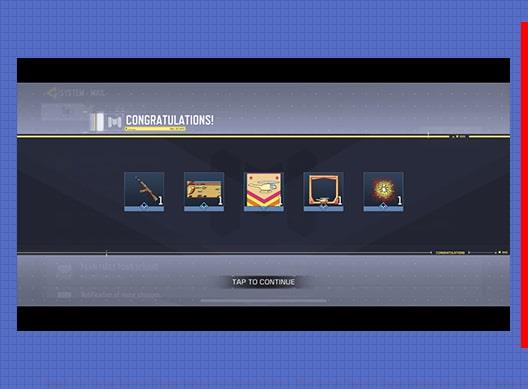
- Finalize the process by submitting your information, then restart COD: Mobile. Your rewards will either appear on the main screen display or be automatically added to your inventory.
Advanced Strategies and Common Pitfalls
Maximize your efficiency in the Pawn Takes Pawn event by implementing these professional strategies and avoiding typical player mistakes.
Pro Tips for Efficient Completion: Always collect multiple glow sticks during your initial bunker entry to avoid backtracking. Position yourself strategically before initiating emotes to ensure proper registration. Complete all poster interactions systematically rather than randomly to prevent missing requirements.
Common Mistakes to Avoid: Many players fail to properly activate emotes by moving too soon after initiation. Ensure each emote completes fully before proceeding to slash posters. Another frequent error involves missing the glow stick collection phase, which is essential for task progression. Always verify you’ve obtained at least one glow stick before attempting other objectives.
Optimization Techniques: Advanced players should memorize the emote sequences to reduce completion time. Consider completing the event during lower server population hours to minimize lag during critical interactions. For maximum efficiency, prepare your redemption information in advance to streamline the code claiming process.
Website Registration and Additional Rewards
Expand your reward potential by engaging with the external Pawn Takes Pawn website component, which offers additional redemption opportunities beyond the in-game event.
Register your account on the official Pawn Takes Pawn website to unlock supplementary content and future reward pathways. The registration process connects your gaming profile with the broader Call of Duty narrative ecosystem.
Follow any additional instructions that subsequently appear within COD: Mobile related to this extended event. These directions may reveal hidden objectives or time-limited opportunities for acquiring extra rewards.
The steps outlined in our main guide will secure your initially guaranteed rewards. If you’ve already obtained these baseline items, the website registration becomes particularly valuable, providing alternative redeemable codes for accomplishing specific achievements that yield additional premium rewards.
This multi-platform approach reflects the evolving nature of modern gaming events, where external engagement often complements in-game activities to create a more immersive and rewarding player experience.
No reproduction without permission:GameCDjnh » What is Pawn Takes Pawn Website? How to Get The Pawn Takes Pawn Rewards in COD Mobile Complete guide to COD: Mobile Pawn Takes Pawn event with step-by-step walkthrough and pro tips