
Master Stranded Deep console commands with practical tips, optimization strategies, and common pitfalls to avoid
Introduction to Stranded Deep Console Commands
Stranded Deep plunges players into a challenging survival experience set across Pacific islands, where resource management and environmental adaptation are crucial for survival. While the core gameplay emphasizes hardship and resourcefulness, the integrated console system provides alternative pathways for those seeking creative freedom or troubleshooting assistance. Understanding these developer tools can transform your island experience from pure survival to creative exploration.
Activating the developer interface requires pressing the backslash key followed by entering “true” to enable command functionality. This gateway unlocks numerous possibilities beyond standard gameplay constraints, allowing players to customize their experience according to personal preferences or specific needs. The console serves both as a debugging tool for developers and a creative sandbox for players.
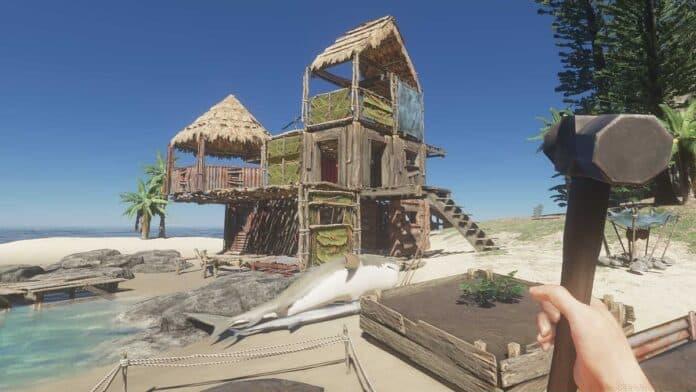
Essential Console Commands Breakdown
The command repertoire in Stranded Deep encompasses various functionalities from performance monitoring to environmental control. Each command serves specific purposes that can significantly alter gameplay dynamics when utilized strategically.
- fps (True/False) – Activates real-time frames-per-second display, essential for performance optimization and hardware capability assessment during intensive gameplay sessions.
- dev.time (0-24) – Enables precise time manipulation, allowing players to skip dangerous nighttime periods or extend daylight hours for critical resource gathering activities.
- help list – Displays comprehensive command inventory, providing immediate access to all available console functions without external reference requirements.
- help (command) – Offers detailed parameter explanations and usage examples for specific commands, reducing trial-and-error experimentation.
- clear – Purges command history from the console interface, maintaining clean workspace organization during extended debugging sessions.
- dev.log.dump – Generates comprehensive gameplay log files on your desktop, invaluable for technical troubleshooting and bug reporting to developers.
- dev.log.view – Displays current session logs directly within the console interface for immediate issue diagnosis during active gameplay.
- dev.log.clear – Erases console log history, improving readability during extended command sequences and complex debugging procedures.
- dev.components.camera.reflections (True/False) – Controls water surface rendering and fog visualization, potentially improving performance on lower-end systems.
- dev.god – Activates invulnerability mode with aerial movement capabilities. Critical safety note: disabling this command during flight results in fall damage proportional to current altitude.
- dev.console (True/False) – Unlocks advanced testing interface, enabling item spawning and environmental manipulation beyond standard gameplay limitations.
Advanced Developer Console Features
Entering “dev.console true” transitions the game into comprehensive developer mode, revealing capabilities far beyond basic command functionality. This elevated access level transforms Stranded Deep from pure survival challenge to creative sandbox environment.
The spawn menu activates by pressing the forward slash key, presenting an extensive catalog of game resources available for instant deployment. This interface allows players to bypass traditional crafting systems, directly accessing building materials, tools, vehicles, and environmental elements. Strategic use of these features can accelerate base construction, enable creative building projects, or simply remove grinding elements for time-constrained players.
Advanced spawning capabilities include terrain modification tools, weather control options, and creature management systems typically reserved for development testing. These powerful features should be used judiciously to maintain gameplay balance while still enjoying creative freedom. The developer console essentially provides a gateway between standard survival gameplay and unlimited creative expression.
Pro Tips and Optimization Strategies
Mastering Stranded Deep’s console commands requires strategic implementation rather than random activation. Performance-conscious players should enable fps display during initial gameplay to identify hardware limitations before engaging in intensive building projects. Time manipulation proves invaluable for players struggling with nocturnal predator encounters or those needing extended daylight for complex construction tasks.
Avoid these common mistakes: Never disable dev.god mode during aerial movement without first descending to safe elevation. Refrain from excessive log dumping during critical gameplay moments as file generation may cause temporary performance hitches. Use camera reflection adjustments sparingly, as disabling certain visual effects may impact environmental awareness and navigation capabilities.
Advanced optimization strategies include using dev.time to accelerate through storm cycles, employing dev.god for safe exploration of dangerous biomes, and utilizing the spawn menu for rapid prototyping of base designs before committing to resource-intensive construction. The most effective console users maintain balance between creative freedom and survival challenge, using commands to enhance rather than replace core gameplay mechanics.
No reproduction without permission:GameCDjnh » Stranded Deep Cheats and Console Commands Master Stranded Deep console commands with practical tips, optimization strategies, and common pitfalls to avoid