
Complete guide to unlocking Intel Fortnite Bundle with eligibility verification and redemption process explained
Intel Fortnite Collaboration Overview
During Fortnite Chapter 2 Season 2, players enjoyed an extensive roster of iconic Marvel superheroes and villains through the Fortnite x Marvel collaboration. This partnership brought beloved characters into the battle royale experience, though their availability is naturally limited by seasonal rotations.
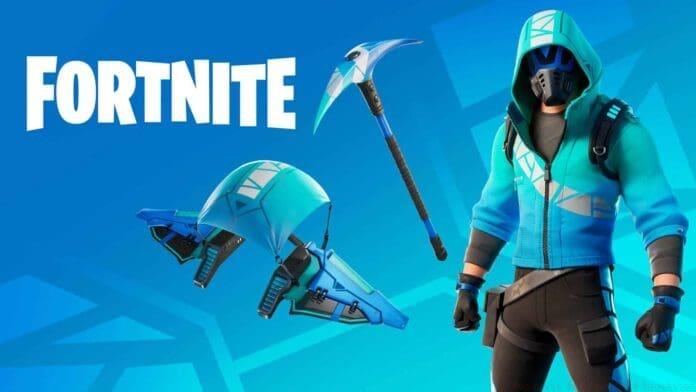
As the season approaches its conclusion, Fortnite has forged a new strategic partnership with technology leader Intel to introduce the exclusive “Splash Squadron Set.” This collaboration marks another major brand integration following the successful Marvel implementation, demonstrating Fortnite’s ongoing strategy of partnering with industry leaders.
While official details from Epic Games remain forthcoming, reputable Fortnite leaker ShiinaBR has provided early insights into the upcoming cosmetic offerings. These leaks offer players advanced notice of what to expect from the Intel partnership.
The Wavebreaker skin represents the centerpiece of the Fortnite X Intel collaboration!
Initial visual confirmation came through direct messages from @eggzbee, with additional verification from @XTigerHyperX discovering complementary imagery that authenticates the leak’s credibility! pic.twitter.com/TA1lhl4AW0
Bundle Contents and Exclusive Features
The Intel Fortnite bundle delivers comprehensive cosmetic enhancements including a distinctive glider and specialized pickaxe alongside the primary Wavebreaker character skin. Beyond the visual customization options, participants gain access to valuable creative software suites including MultiCam Capture for streaming, Photo Director for image editing, and Vegas Pro 365 for video production.
This collaboration maintains platform exclusivity for PC gamers, aligning with Intel’s core market. The bundle strategically combines gaming cosmetics with practical creative tools, offering dual value for content creators and competitive players alike.
Pro Tip: The included creative software can significantly enhance your content creation capabilities if you’re interested in streaming or video editing. These tools typically carry substantial individual subscription costs, making them valuable additions beyond the cosmetic items.
Eligibility Requirements and Processor List
Accessing the Intel Fortnite Bundle requires ownership of qualifying Intel processor models. The eligibility criteria focus on recent generations to ensure compatibility with both the game and bundled software applications.
Common Mistake to Avoid: Many players mistakenly assume any Intel processor qualifies. Only specific models from the 10th generation and newer typically meet the requirements. Always verify your exact processor model through system settings before attempting redemption.
Eligible processors generally include Core i5, i7, and i9 models from 10th generation onward, along with select Core i3 processors and specific Intel Xeon workstation CPUs. The complete updated list should be verified through Intel’s official promotion portal as specifications may change.
Step-by-Step Redemption Process
For qualified processor owners, begin by visiting Intel’s official promotion portal and authenticating with your existing credentials or establishing a new account if needed. The subsequent critical step involves linking your Epic Games account with your Intel account to enable cross-platform entitlement transfer.
Once accounts are securely connected, locate and select the “Redeem Offer” option, then complete the verification protocol. You’ll need to identify your specific SKU identifier, which can typically be found through your processor’s documentation or system information tools.
The final phase requires downloading and executing the Intel Hardware Scanning Tool, which automatically validates your system’s eligibility and processes the bundle redemption. This tool confirms your hardware meets the technical requirements before unlocking the content.
Optimization Tip: Ensure all background applications are closed before running the hardware scanning tool to prevent conflicts. Administrator privileges may be required for accurate system detection.
Do your system specifications align with the Intel Fortnite Bundle requirements? Share your experiences and questions in the comments section below.
Recommended: How to get Fortnite Support A Creator Code Easily
No reproduction without permission:GameCDjnh » Intel Fortnite Bundle: How To Claim The Fortnite Splash Squadron Set? Complete guide to unlocking Intel Fortnite Bundle with eligibility verification and redemption process explained