
TL;DR
- CS2 sticker scraping allows precise removal or partial wearing of stickers with percentage-based control
- Right-click weapon skins in inventory and select ‘Scrape Sticker’ for controlled removal process
- Partial scraping creates unique borderless effects on team logos and autograph stickers
- Each weapon accommodates up to five stickers, requiring strategic sticker management
- Recent CS2 updates provide enhanced customization with visual previews before confirmation
When you acquire a new weapon skin through the Steam Market that arrives with unattractive stickers, or when you aim to transform a Major tournament autograph sticker into its borderless variation for your preferred firearm, mastering CS2 sticker scraping becomes an essential skill for weapon customization.
The sticker scraping feature in Counter-Strike 2 provides players with granular control over sticker appearance, enabling either gradual degradation through partial removal or complete elimination of unwanted designs from weapon finishes. This systematic approach facilitates inventory organization and creates opportunities for applying fresh sticker combinations. Given that every CS2 firearm supports a maximum of five sticker placements simultaneously, strategic removal becomes necessary when you need to clear space for new additions to your primary weapons like the AK-47 or M4A4.
If the sticker scraping process seems confusing and you’re concerned about accidentally damaging valuable weapon skins through incorrect actions, this comprehensive guide provides the clarity and security you need.
Modern CS2 sticker mechanics have undergone significant improvements, making the scraping procedure more intuitive and customizable than previous iterations. Gamers can now specify exact scraping percentages for precision control, a particularly valuable feature when attempting to eliminate borders from tournament team emblems or player signature stickers while preserving the core design elements.

The precise methodology for sticker removal in CS2 involves a straightforward sequence of inventory interactions. Below we outline the complete procedural workflow for effective sticker management:
Initiate Counter-Strike 2 and navigate to your personal inventory interface where all acquired skins and items are displayed.
Locate the specific weapon skin containing the sticker you intend to modify or remove. Use search filters or scrolling to quickly identify your target weapon.
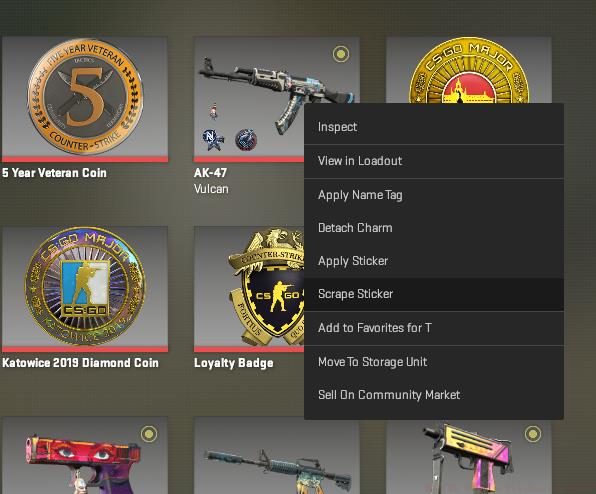
Execute a right-click action on the selected skin, then choose the ‘Scrape Sticker’ option from the contextual menu that appears. This action initiates the scraping interface without immediately altering your sticker.

The scraping interface presents a visual representation of the sticker with percentage-based removal controls. Adjust the scraping level according to your preference—whether seeking subtle wear effects or complete removal.

Finalize the process by confirming your scraping selection. The system provides a preview of the expected outcome before applying changes permanently to your weapon skin.

Seasoned CS2 players employ sophisticated scraping techniques to maximize both aesthetic appeal and inventory value. Partial scraping—removing between 20-80% of a sticker—creates distinctive weathered appearances that many collectors prefer over pristine or completely removed stickers.
Borderless Sticker Mastery: For tournament stickers with prominent borders, apply approximately 40-60% scraping to eliminate the border while preserving the core logo or signature. This technique requires precise control to avoid over-scraping that damages the central design elements.
Common Rookie Mistakes: Novice players often scrape too aggressively, permanently destroying valuable stickers instead of achieving the desired worn effect. Always start with minimal scraping (10-20%) and gradually increase until reaching your preferred appearance. Remember that scraping cannot be reversed once confirmed.
Weapon Skin Protection: The scraping process exclusively affects stickers and doesn’t damage the underlying weapon skin. However, repeatedly applying and removing stickers from the same position may create subtle visual artifacts over time. For pristine collector skins, consider our Weapons Unlock guide for alternative customization approaches.
Strategic Sticker Rotation: Since each weapon accommodates only five stickers, develop a rotation strategy for your favorite firearms. Remove lower-preference stickers when new tournament stickers become available, or create thematic combinations for specific maps or gameplay styles. For broader strategic context, consult our Complete Guide to weapon customization systems.
Economic Considerations: Partially scraped stickers often retain more market value than completely removed ones, especially for rare tournament holograms and foils. Consider the long-term collection value before committing to full removal of premium stickers.
Action Checklist
- Inventory Navigation: Launch CS2 and access your skin collection through the inventory interface
- Sticker Identification: Locate target weapon and analyze current sticker configuration
- Precision Scraping: Right-click weapon, select ‘Scrape Sticker’, and adjust removal percentage
- Borderless Conversion: Apply 40-60% scraping to tournament stickers for border removal
- Strategic Rotation: Develop sticker rotation plan for your five available slots per weapon
No reproduction without permission:GameCDjnh » How To Scrape Stickers in CS2? Master CS2 sticker scraping with precision control, strategic removal techniques, and borderless customization options