
TL;DR
- Your Epic Games display name differs from platform-specific names and is essential for trading
- Always use PC platform email addresses when available for faster account identification
- Configure your account to automatically accept friend requests to streamline the trading process
- Professional trading services provide instant item delivery and eliminate hours of grinding
- Verify seller reputation, security measures, and refund policies before making purchases
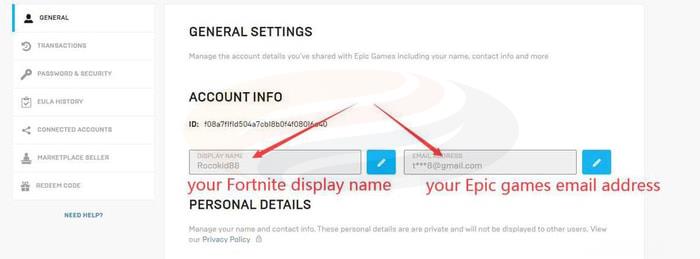
When purchasing Fortnite STW items through trusted marketplaces, providing accurate account credentials becomes crucial for successful transactions. Your Fortnite display name serves as your primary identifier within the Epic Games ecosystem, while your Epic Games email address enables secure communication and verification. Many players maintain separate email associations across different gaming platforms, but for optimal efficiency, always provide the address linked to your PC platform account, as this typically offers the most straightforward method for suppliers to locate your profile. Additionally, configuring your privacy settings to automatically accept friend requests significantly accelerates the trading workflow. Understanding these fundamental requirements ensures seamless item transfers and minimizes potential delays.
A common mistake involves confusing platform-specific names with your actual Epic Games identity. PlayStation Network and Xbox Live usernames often differ from your core display name, which can create confusion during transaction processing. Seasoned traders recommend double-checking these details before initiating any purchases to prevent unnecessary complications. The distinction becomes particularly important for cross-platform players who may have established separate identities across their gaming devices.
1. Navigate to www.epicgames.com using your preferred web browser. Ensure you’re accessing the official Epic Games domain to avoid phishing attempts or security risks. Bookmarking this address can save time for future reference and ensure you always land on the authentic website.
2. Locate and select the Sign-in option positioned in the upper right corner of the page. Authenticate using your preferred method, whether through direct credentials, platform integration, or two-factor authentication if enabled.
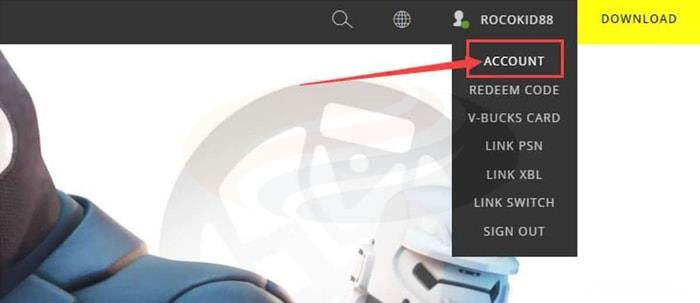
3. Hover your cursor over your visible display name in the navigation bar, then click the “Account” option that appears in the dropdown menu. This action redirects you to your personal account dashboard where both your Fortnite display name and associated Epic Games email address become accessible. Critical reminder: PlayStation 4 and Xbox One users must provide their Epic Games identifier rather than their console-specific gamertags.
4. Following successful payment processing, launch your Fortnite game client and promptly accept the incoming friend request from our verified supplier. This initial connection enables them to invite you to a private session, generate a customized map environment, and securely deposit the purchased items for collection. Advanced players often prepare their inventory space beforehand to ensure smooth transfer of acquired resources.
The traditional approach to acquiring various Fortnite resources often demands extensive gameplay hours, but established trading platforms provide immediate access to materials, weaponry, and defensive traps upon order confirmation. This efficiency transforms the gaming experience by eliminating repetitive grinding sessions while maintaining progression momentum.
1. Rapid Delivery and Expert Support
We guarantee swift transaction completion through maintained reliable supply chains and consistently stocked inventories, enabling prompt order fulfillment. Our direct player-to-player exchange methodology ensures transparency, with the majority of Fortnite item transfers concluding within 10-30 minute windows. All available inventory originates from experienced players, and our support representatives remain accessible continuously throughout the year. Don’t hesitate to reach out whenever assistance becomes necessary.
2. Established Reputation and Extensive Experience
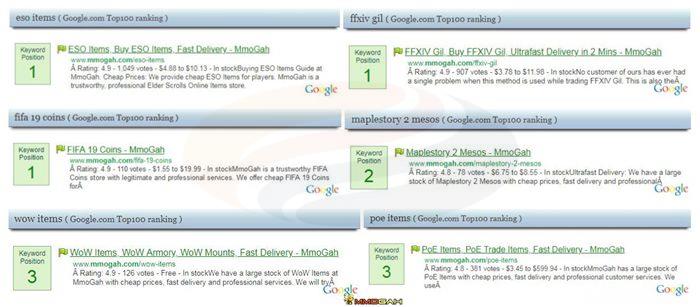
More than a decade of specialized experience in virtual gaming economies enables us to accommodate diverse customer requirements. Our marketplace consistently ranks among premier online gaming product providers across major search platforms for leading video game titles.
3. Competitive Pricing Structure
While continuously refreshing our available item selections, we maintain attractive pricing strategies. Customers benefit from tiered discount systems including 2%-10% promotional coupons and 1%-3% loyalty member reductions. Consult our additional marketplace resources for comprehensive strategies on optimizing your purchasing power for Fortnite Items.
4. Comprehensive Refund Assurance
We guarantee customers receive precisely what they ordered or obtain full monetary reimbursement. Should purchased items become unavailable, our support team processes refunds immediately upon notification.
Continue monitoring our platform for additional updates and instructional content covering both Fortnite: Save the World and Fortnite: Battle Royale game modes.
YOU MAY ALSO LIKE:
Tips and Tricks: How to Play Better in Fortnite: Battle Royale
Fortnite: Top 5 Best Weapons
Action Checklist
- Verify your exact Epic Games display name through the account dashboard
- Confirm your primary PC-associated email address for supplier identification
- Adjust privacy settings to automatically accept friend requests
- Clear inventory space to accommodate new items before transaction
- Research seller reputation and security measures before purchasing
No reproduction without permission:GameCDjnh » How to Purchase Items for Fortnite STW at MmoGah Complete guide to finding your Fortnite credentials and choosing reliable item trading services