
TL;DR
- UNDECEMBER supports full cross-platform play between Steam and mobile devices
- Account linking requires careful planning to avoid permanent character loss
- The process uses a 12-digit code system for secure data transfer
- Linked accounts cannot be accessed simultaneously on different platforms
- Always use a disposable account for the linking target to prevent data loss
UNDECEMBER delivers seamless cross-platform functionality that enables players to continue their gaming sessions across different devices. By connecting your Steam and mobile accounts, you gain the flexibility to switch between platforms while maintaining your game progress and character data. This comprehensive guide provides detailed instructions for establishing this crucial connection between your gaming environments.
The cross-platform linking process can be initiated from either Steam or mobile versions. However, it’s essential to understand that while you can freely alternate between platforms after linking, simultaneous access from multiple devices is restricted. Additionally, during the account synchronization procedure, any existing characters in the destination account will be permanently erased without recovery options.
Throughout this tutorial, we’ll refer to your primary gaming account as the “Linking Account” and the secondary account designated for connection as the “Account to be Linked with“. For optimal safety, we strongly recommend creating a fresh, unused account specifically for the linking process.
Linking Account (red) and Account to be Linked with (blue)
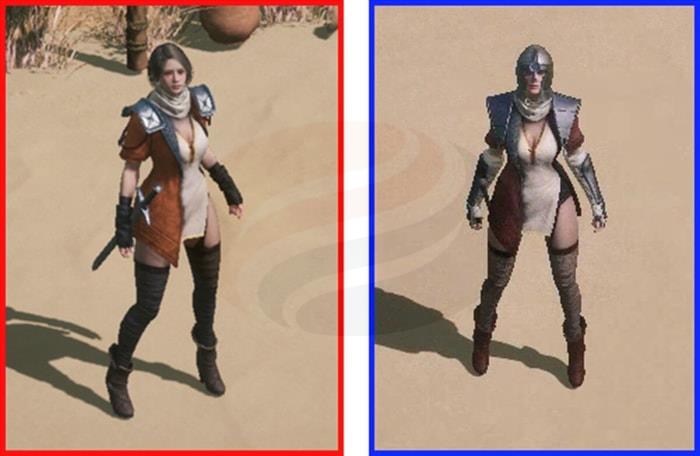
Step 1. Access both gaming profiles simultaneously: your primary Linking Account (whether on PC or mobile) and the secondary Account to be linked with (on the complementary platform). Ensure both accounts are logged into the same game server region for compatibility.
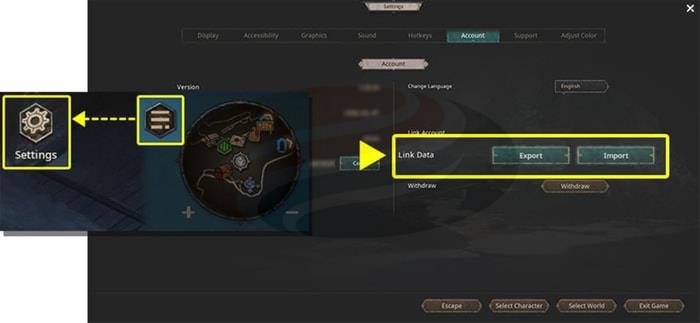
Step 2. Navigate to the in-game Menu interface and select the Settings option, where you’ll locate the crucial “Link Data” feature within the Account management section.
Find Link Data in UNDECEMBER
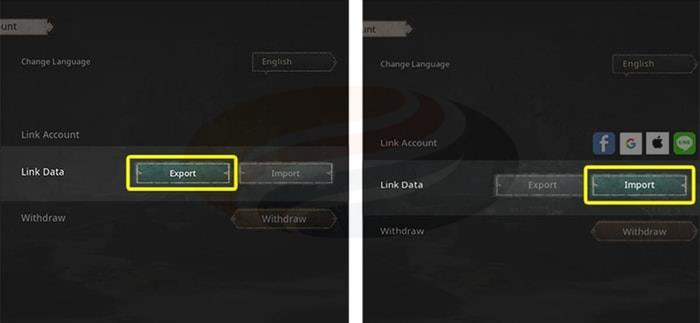
Step 3. Choose the “Export” function from your primary Linking Account and, on the secondary Account to be Linked with, activate the “Import” option.
Select Export on the Linking Account and press Import on the Account to be Linked with
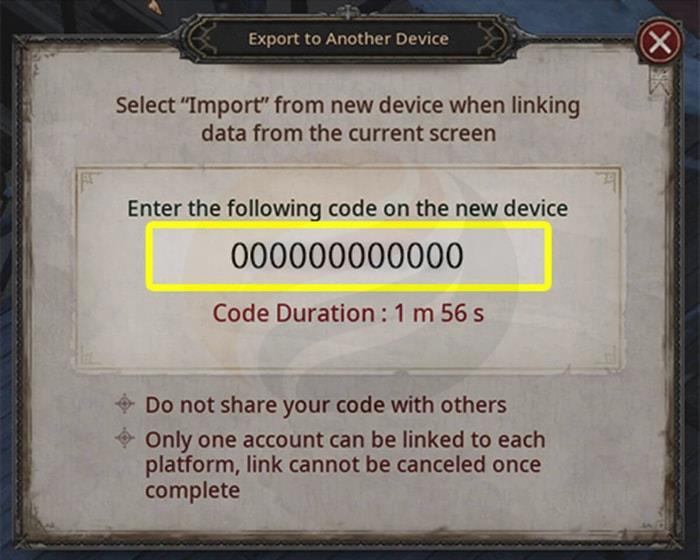
Step 4. Execute the “Export” command on your primary Linking Account and carefully note the unique 12-digit authorization code displayed in the confirmation window.
Step 5. Activate the “Import” feature on the secondary Account to be Linked with and input the 12-digit verification code into the designated field. Subsequently, confirm the action by selecting “Send Code“.
Press Send Code after entering the 12-digit code
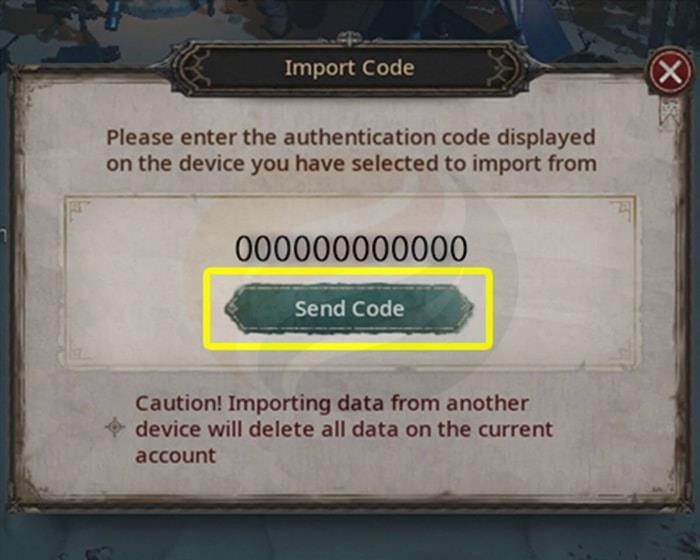
Step 6. Following the “Send Code” confirmation, proceed by clicking the “OK” button when the system notification appears.
Any characters on the linked account will be deleted

This synchronization enables you to utilize your primary Linking Account across both desktop and mobile gaming environments. Be aware that the secondary account will be automatically disconnected immediately upon completion of the linking procedure.
At this stage, you should restart the game application to ensure all changes are properly applied.
It’s absolutely vital to remember that following the automatic logout, all character data stored in the linked account will be permanently removed and become inaccessible. Furthermore, the erased character information cannot be restored through any means.
1. Ensure strict confidentiality of your Export “Account Code” throughout the entire linking operation.
2. Cross-platform account synchronization is exclusively available between accounts operating on identical game servers.
3. The character data eliminated during the account merging process is irrevocably lost. Exercise extreme caution throughout this procedure.
4. Simultaneous access to both PC and mobile platforms is prohibited following successful cross-platform linking.
For players seeking to enhance their gaming experience, consider exploring our comprehensive Complete Guide to master advanced gameplay mechanics. Additionally, our detailed Weapons Unlock guide provides essential strategies for weapon acquisition, while the Class Guide offers strategic insights for character development.
Action Checklist
- Create a disposable secondary account specifically for linking purposes
- Verify both accounts are on the same game server before starting
- Carefully document the 12-digit export code before proceeding
- Complete the import process within 10 minutes of code generation
- Restart the game application after linking completion
No reproduction without permission:GameCDjnh » How to Link Your UNDECEMBER Accounts for Cross-Play (Steam) Complete guide to linking UNDECEMBER accounts across Steam and mobile platforms with essential precautions