
TL;DR
- Use Steam Marketplace’s ‘Inspect in Game’ feature for direct skin previews
- Leverage community tools like CS2inspects.com for sticker customization
- Join Epidemic’s inspect servers for comprehensive sticker visualization
- Always verify wear ratings and sticker placement before purchasing
- Utilize gen codes for precise sticker positioning and preview
The CS2 cosmetic ecosystem represents one of gaming’s most vibrant marketplaces, where weapon skins and decorative stickers create substantial economic and aesthetic value. Understanding how to properly evaluate these items before purchase can save you from costly mistakes while ensuring you acquire exactly what you envision for your loadout.
Many players underestimate the importance of thorough inspection, often purchasing items based solely on thumbnail images. This approach frequently leads to disappointment when the actual in-game appearance differs significantly from expectations. Proper inspection techniques provide crucial visual confirmation of wear patterns, color saturation, and sticker placement accuracy.
The community-driven nature of CS2 cosmetics has spawned numerous third-party tools that complement Valve’s official inspection features. These resources have become essential for serious collectors and traders who need precise visualization before committing to transactions that can involve substantial financial investments.
Begin your skin evaluation journey by navigating to the official Steam marketplace, where Valve provides integrated inspection capabilities. Start with precise search techniques—enter the exact skin name combined with specific wear ratings like Factory New, Minimal Wear, or Battle-Scarred to filter results accurately. This initial step prevents confusion between similar-looking skins with different wear patterns that significantly affect both appearance and value.
Once you’ve identified the correct listing, utilize the “Inspect in Game” feature strategically. If CS2 is already running, this triggers an immediate in-game preview window. For closed game instances, the system automatically launches the game and loads the inspection interface. This seamless integration allows you to examine the skin from multiple angles, check lighting effects, and assess how it appears in various in-game environments.

Professional traders recommend inspecting skins under different lighting conditions and while moving the weapon to catch subtle details that static images miss. Pay particular attention to wear locations—scratches on critical visual areas can dramatically reduce aesthetic appeal despite similar wear ratings. This thorough examination process typically takes 2-3 minutes but can prevent buyer’s remorse from costly purchases.
While CS2 lacks native sticker inspection features, the community has developed sophisticated workarounds using sticker craft platforms. CS2inspects.com stands as the most popular solution, offering comprehensive customization tools that simulate exactly how stickers will appear on various weapons. The site’s recently enhanced “Customize Sticker” functionality allows precise placement control, mimicking the game’s actual sticker application system.
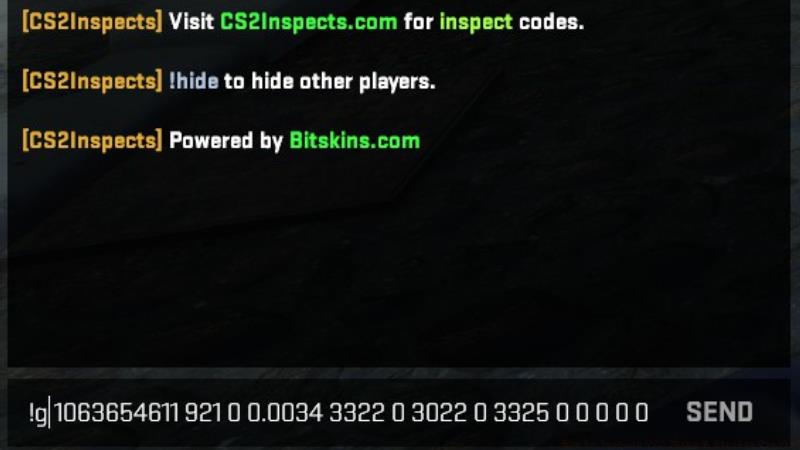
After designing your ideal sticker configuration, generate the unique gen code—the lengthy identifier beginning with “!g” that encapsulates your customization choices. This code serves as a blueprint that inspection servers interpret to recreate your exact sticker placement. Copy this code carefully, as even minor errors will produce incorrect visualizations.
Connect to specialized CS2 inspect server networks like Epidemic’s servers, which provide optimized environments for sticker previews. These community-maintained servers feature multiple map options that showcase your customized weapons under various lighting conditions. The entire process from website customization to in-server inspection typically requires 5-7 minutes but provides invaluable visual confirmation before purchasing expensive stickers.
Seasoned CS2 collectors emphasize several optimization strategies for skin and sticker evaluation. Always cross-reference marketplace listings with multiple inspection tools to identify inconsistencies. Beware of screenshots that might use custom lighting or editing to mask imperfections—direct in-game inspection remains the only reliable verification method.
Common inspection mistakes include neglecting to check sticker scraped versions (which appear differently as stickers wear down), overlooking how stickers wrap around weapon edges, and failing to evaluate how skins appear during actual gameplay rather than just in inspection menus. These oversights frequently lead to disappointing purchases that don’t match expectations during active gameplay.
For advanced market participants, understanding wear pattern distributions can reveal value opportunities. Certain wear configurations are rarer and more desirable, potentially making moderately worn skins more valuable than their better-condition counterparts if the scratches appear in less visible areas. This nuanced understanding separates casual buyers from serious collectors in the CS2 ecosystem.
Action Checklist
- Search Steam Marketplace using exact skin name and wear rating
- Use ‘Inspect in Game’ feature and examine under different lighting
- Visit CS2inspects.com for sticker customization and gen code generation
- Join Epidemic’s inspect servers to visualize customized stickers
- Verify wear patterns and sticker placement from multiple angles
No reproduction without permission:GameCDjnh » How to Inspect CS2 Skins & Sticker Crafts? Master CS2 skin and sticker inspection techniques using Steam marketplace and community tools effectively