
Complete guide to downloading and using Unreal Editor for Fortnite with expert tips and troubleshooting advice
Understanding Unreal Editor for Fortnite
Unreal Editor for Fortnite represents a significant advancement in content creation capabilities within the Fortnite ecosystem. This powerful toolset brings professional-grade development features previously exclusive to Unreal Engine into the hands of Fortnite creators. Unlike traditional game development environments, UEFN operates in parallel with Fortnite’s established Creative mode, providing a bridge between casual creation and professional development workflows.
The platform’s architecture supports real-time collaborative development, enabling multiple creators to work simultaneously on the same project across different devices. This collaborative environment significantly accelerates development cycles and allows for more complex project execution. As UEFN continues to evolve, it progressively incorporates more tools from the full Unreal Engine suite, expanding what creators can achieve within the Fortnite universe.
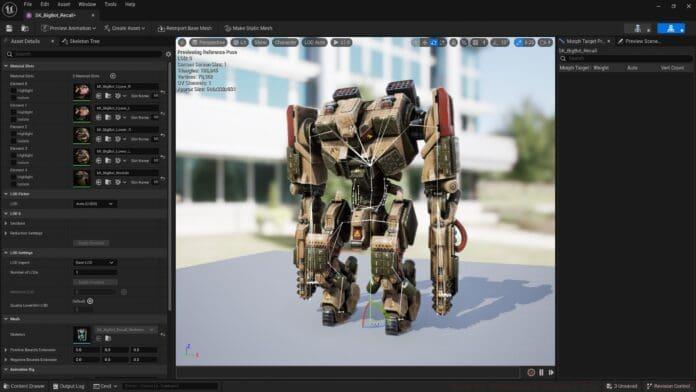
System Requirements and Compatibility: Before downloading UEFN, ensure your system meets the minimum specifications. You’ll need Windows 10 or later (64-bit), a DirectX 11 or 12 compatible graphics card, 8GB RAM (16GB recommended), and sufficient storage space. The editor requires Fortnite to be installed and functions exclusively on PC platforms, though created content remains accessible across all supported Fortnite devices.
Step-by-Step Download Guide
Acquiring Unreal Editor for Fortnite follows a streamlined process designed for accessibility. Begin by ensuring you have an active Epic Games account with verified email authentication. Account verification is crucial as it enables access to the Epic Games Store and associated development tools.
Download Process:
- Navigate to the Epic Games Store and locate Unreal Editor for Fortnite in the search results
- Select the “Get” option displayed prominently on the application page
- Authenticate using your Epic Games credentials if not already signed in
- Initiate the download process and monitor installation progress
- Launch UEFN through the Epic Games Launcher upon completion
Common Installation Issues: Many users encounter installation hurdles related to administrator privileges or antivirus interference. Always run the Epic Games Launcher with administrative rights and temporarily disable security software during installation. Ensure adequate disk space allocation—UEFN requires approximately 15GB for core files plus additional space for projects and assets.
Post-Installation Setup: After successful installation, configure your development environment by setting project directories and establishing backup protocols. Familiarize yourself with the interface layout and customize workspace panels according to your workflow preferences. Consider creating template projects to streamline future development initiatives.
Getting Started with Development
Launching your first UEFN project requires strategic planning and understanding of available tools. Begin by selecting appropriate project templates that align with your creative vision—options range from battle arenas to exploration maps and puzzle challenges. Each template provides foundational elements that accelerate development while maintaining customization flexibility.
Essential Development Tools: UEFN incorporates sophisticated asset management systems, terrain editors, and scripting interfaces. Master the asset browser for efficient resource organization and utilize the landscape tools for environmental design. The visual scripting system enables complex gameplay mechanics without traditional coding knowledge, though programming experience enhances implementation possibilities.
Performance Optimization Strategies: Maintain optimal performance by monitoring resource usage metrics throughout development. Implement level streaming for large maps, optimize texture resolutions based on viewing distance, and utilize occlusion culling techniques. Regular performance profiling identifies bottlenecks before they impact user experience.
Collaboration Best Practices: When working in teams, establish clear asset naming conventions and version control protocols. Utilize UEFN’s real-time collaboration features for simultaneous editing while maintaining communication through integrated chat functions. Regular project backups prevent data loss during intensive development sessions.
Frequently Asked Questions
What distinguishes Fortnite Creative from UEFN?
Fortnite Creative provides accessible in-game tools for straightforward map creation, while UEFN delivers comprehensive development environment with advanced capabilities. Think of Creative as the introductory platform and UEFN as the professional upgrade—both coexist and complement each other within the creation ecosystem.
How do I access my created content?
Launch Fortnite and navigate to the Creative mode selection screen. Your published islands appear in the “My Islands” section, accessible across all platforms where Fortnite is available. Unpublished works remain in UEFN until officially released to the community.
Can development teams collaborate remotely?
Yes, UEFN supports distributed team collaboration through shared project access. Team members can simultaneously edit different aspects of the same project, with changes syncing in real-time. This facilitates efficient workflow distribution and accelerated development cycles.
What creation possibilities exist within UEFN?
The platform supports extensive customization including custom game mechanics, original asset implementation, complex environmental design, and interactive elements. Advanced users can incorporate custom programming logic and unique visual effects unavailable in standard Creative mode.
Available development tools overview
UEFN provides terrain editors, asset import functionality, visual scripting interfaces, animation systems, lighting tools, and audio implementation features. The toolset continuously expands with updates that incorporate additional Unreal Engine capabilities.
Content sharing and publication process
Completed projects undergo submission review before public release. The publication process includes compatibility testing, content evaluation, and performance verification. Approved content becomes available to the entire Fortnite community through the Creative hub.
Cost structure and accessibility
UEFN remains completely free—no subscription fees or purchase requirements exist. However, custom assets from marketplaces may involve separate costs. The platform’s revenue sharing model provides compensation for popular published content.
V-Bucks acquisition clarification
Virtual currency cannot be earned through Creative mode activities. V-Bucks exclusively come from Battle Pass progression or direct purchase. However, successful published content can generate revenue through Epic’s creator support programs.
No reproduction without permission:GameCDjnh » How to Download Unreal Editor for Fortnite? Complete guide to downloading and using Unreal Editor for Fortnite with expert tips and troubleshooting advice