
TL;DR
- Facebook linking preserves game progress across devices and enables friend interactions
- Access settings through the three-line menu icon and tap Connect for authentication
- Verify connection status by checking for Disconnect button in account management
- Troubleshoot common issues like app permissions and Facebook login problems
- Strategic linking enhances gameplay through coordinated friend activities and bonuses
Connecting Monopoly Go to your Facebook account transforms your gaming experience from isolated sessions to a persistent, social adventure. This integration serves as your digital safety net, automatically saving every dice roll, property purchase, and tournament achievement to cloud storage. Without this connection, losing or changing devices could mean starting completely over, erasing weeks or months of strategic progress.
The social dimension unlocks significant gameplay advantages. When linked, you’ll see which Facebook friends are active in Monopoly Go, enabling coordinated gameplay, gift exchanges, and tournament collaborations. These social interactions often yield bonus dice rolls, property trades, and special event participation that solo players miss entirely.
Cross-device accessibility means you can begin a game session on your phone during commute hours, then continue seamlessly on your tablet at home. This flexibility is particularly valuable during limited-time events where every playing opportunity counts toward exclusive rewards and leaderboard positioning.
Initiating the Facebook connection requires precise navigation through Monopoly Go’s interface. Begin by launching the application and locating the subtle three-line menu icon positioned in the screen’s upper right quadrant. This hamburger menu serves as your gateway to the game’s social and account management features.
Once the menu expands, identify the prominent blue “Connect” button—this is your activation point for the linking sequence. Tapping this triggers the authentication handshake between Monopoly Go and Facebook’s platform.
The system will present Facebook’s secure login interface, where you must enter your credentials exactly as registered. A common mistake involves using outdated passwords or attempting login through expired sessions. Ensure you’re using your primary Facebook account rather than temporary or secondary profiles.
Successful authentication creates a bidirectional link where Monopoly Go accesses your friend list while Facebook registers your gaming activity. This connection enables the game to display Facebook friends who also play, automatically adding them to your in-game contacts for immediate collaboration opportunities.
Connection establishment typically completes within 15-30 seconds, after which your progress becomes permanently cloud-anchored. You’ll receive visual confirmation through interface changes and potentially a welcome bonus for first-time linking.
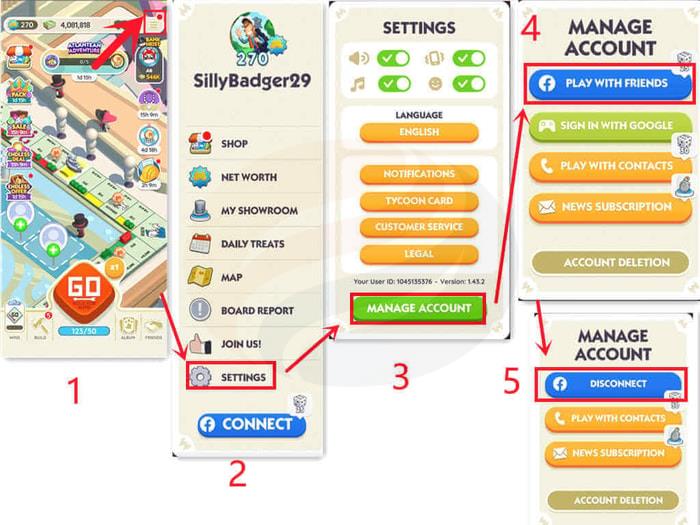
Regular verification of your Facebook connection status prevents unexpected progress loss. Navigate to the same three-line menu icon used for initial linking, but this time select “Settings” from the available options. This reveals the deeper account management controls.
Within Settings, locate and tap “Manage Account”—this specialized section displays all active external connections and their current status. The “Play with Friends” option specifically reveals the Facebook integration state through clear visual indicators.
The presence of a “Disconnect” button serves as definitive proof of successful Facebook linkage. This button only appears when an active, authenticated connection exists between the platforms. Its absence indicates either a failed connection attempt or a previously established link that has since been severed.
For additional confirmation, check your in-game friends list for Facebook contacts. If you see friends with profile pictures matching their Facebook accounts, your integration is functioning correctly. The system typically syncs friend data within 2-4 hours of initial connection.
Connection failures often stem from Facebook app permissions rather than Monopoly Go issues. Before attempting linkage, verify that your Facebook app has permission to share friend lists and basic profile information. Mobile settings sometimes restrict these permissions after operating system updates.
Privacy-conscious players should know that Monopoly Go only accesses your public profile information and friend list—it cannot post to your timeline or access private messages without explicit permission. The integration focuses specifically on gameplay enhancement rather than social media broadcasting.
Strategic linking involves timing your connection to maximize benefits. Consider connecting before major tournament events when friend collaborations become most valuable. Early linking also ensures you don’t miss limited-time connection bonuses that developers occasionally offer.
If you encounter persistent “Authentication Failed” errors, the solution often involves clearing both Monopoly Go and Facebook app caches, then restarting both applications before reattempting connection. This resolves most temporary token expiration and session conflicts.
For players concerned about data usage, the Facebook connection consumes minimal bandwidth—typically under 5MB monthly for synchronization activities. The gameplay and progress protection benefits far outweigh this minimal data investment.
Action Checklist
- Verify Facebook app permissions allow friend list sharing
- Navigate to menu icon → Connect → Authenticate with Facebook
- Confirm connection via Settings → Manage Account → Check for Disconnect button
- Validate friend list synchronization within 4 hours
- Test cross-device progress saving by logging in on alternative device
No reproduction without permission:GameCDjnh » How to Connect Monopoly Go to Facebook and Check Account Binding Master Monopoly Go Facebook integration for cross-device saves and friend gameplay advantages