
TL;DR
- Valorant locks accounts to creation region but offers three server switching methods
- In-game selection works for same-region servers but not cross-region transfers
- Riot Support can transfer regions permanently for legitimate relocation cases
- VPN creation enables new accounts in desired regions but requires starting fresh
- Latency, progression, and competitive integrity vary significantly by method
Mastering Valorant’s server infrastructure begins with understanding its strict regional account locking mechanism. Unlike many competitive shooters that offer flexible server hopping, Riot Games implements geographical restrictions that tie your gaming identity to your initial registration location. This regional anchoring affects matchmaking, friend lists, and competitive rankings across different parts of the globe.
When comparing Valorant to other popular tactical shooters like CS2 or emerging titles like Marvel Rivals, the regional restrictions stand out as particularly stringent. Your account becomes permanently associated with the geographical server cluster where you first created it—European accounts cannot access North American matchmaking, while Asian players cannot join South American servers. This design choice maintains competitive integrity but limits geographical flexibility for traveling players or those with international friend groups.
Fortunately, Riot Games provides several legitimate pathways to navigate these restrictions, though each comes with specific limitations and requirements. Understanding these options before attempting server changes can save significant time and prevent potential account complications.
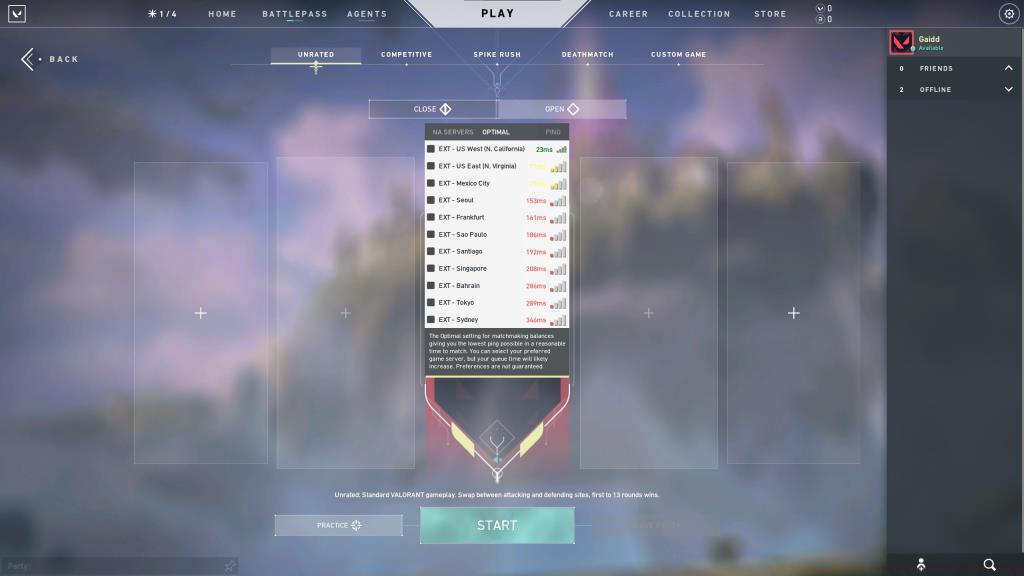
The most straightforward approach to server modification involves using Valorant’s built-in server selection feature. Accessible directly from the Play tab in the main menu, this interface displays all available servers within your designated region. Players can toggle between different geographical clusters to find optimal ping times or join friends in adjacent server locations.
However, this convenient feature comes with significant geographical constraints. Server selection only functions within your predetermined regional boundaries—European accounts can choose between London, Frankfurt, and Paris servers but cannot access North American or Asian clusters. This limitation preserves regional competitive ecosystems while providing some flexibility for local server optimization.
For players experiencing high latency on their default server, this method offers immediate relief without complicated procedures. Testing different servers within your region can reveal significant ping improvements, especially for players located near regional borders or those using internet providers with suboptimal routing.
When genuine geographical relocation necessitates permanent server changes, Riot Games offers official region transfer services through their support system. This method involves submitting a formal request to Riot’s player support team with evidence of your legitimate need for region modification, such as proof of international relocation or documentation showing incorrect initial region assignment.
To initiate this process, players must contact Riot support directly through the official support portal and clearly articulate their region change requirements. Support representatives evaluate each request individually, prioritizing cases involving permanent international moves or demonstrable region assignment errors. Temporary travel or desire to play with international friends typically doesn’t qualify for official region transfers.
The transfer process typically requires 3-5 business days for completion, during which your account may experience temporary accessibility restrictions. Upon successful transfer, all account progression, unlocked agents, and purchased cosmetics migrate to the new region, though competitive rankings reset to accommodate the new server environment. This method provides the most seamless transition for legitimate relocations while maintaining your hard-earned progression.
For players seeking immediate access to different regional servers without meeting Riot’s transfer criteria, virtual private networks (VPNs) offer an alternative pathway. This approach involves creating an entirely new Valorant account while connected to a VPN server in your desired region, effectively establishing a fresh gaming identity tied to that geographical location.
The technical execution requires precise sequencing: first, activate your VPN service and connect to a server in your target country. While maintaining this connection, navigate to Riot’s account creation portal and establish a new account. Before launching Valorant, ensure your Riot Client reflects the newly created credentials. The game client automatically detects your apparent geographical location and assigns your account to the corresponding regional server cluster.
This strategy enables immediate multi-region access but comes with significant trade-offs. You’ll start with a completely fresh account—no agent unlocks, cosmetic items, or competitive rank carryover. Managing multiple regional accounts requires careful organization, and VPN usage during actual gameplay may violate Riot’s terms of service, potentially risking account penalties. For comprehensive gameplay strategies across different titles, our Complete Guide offers valuable cross-game tactical insights.
Seasoned Valorant players often develop sophisticated server management strategies to optimize their gaming experience. Understanding regional meta differences can inform server selection decisions—some regions develop distinct playstyles that might better suit your personal approach to the game. Asian servers often emphasize precise mechanical skill, while European matches might showcase more strategic team coordination.
Latency considerations remain paramount when exploring different servers. Even with official region transfers, physical distance to server locations creates inherent ping disadvantages. East Coast North American players transferring to Asian servers should expect 150-200ms latency regardless of transfer method. For weapon proficiency across different gaming environments, our Weapons Unlock guide provides transferable aiming techniques.
Competitive players should carefully consider ranking implications when contemplating server changes. Each region maintains independent ranked ladders with distinct competitive landscapes. Transferring between regions resets your ranked status, requiring new placement matches and adaptation to regional meta differences. For strategic approaches that translate across competitive environments, explore our Class Guide for role-specific tactical frameworks.
Account management becomes increasingly important for players maintaining multiple regional presences. Using distinct email addresses and password combinations for each regional account prevents accidental login confusion. Regularly updating account recovery information ensures you don’t lose access to valuable progression across different server environments.
Action Checklist
- Evaluate your specific server change needs and determine which method suits your situation
- For same-region server changes, use in-game server selection in the Play tab
- For permanent relocations, gather documentation and contact Riot Support for official transfer
- For immediate regional access, set up VPN and create new account with precise sequencing
- Test latency and adapt playstyle to regional meta differences after server change
No reproduction without permission:GameCDjnh » How To Change Servers in Valorant: 2025 Guide Master Valorant server switching with expert methods, region transfer tips, and VPN strategies for global gameplay