
TL;DR
- CS2 lacks direct server selection but offers ping-based matchmaking control
- Adjust Max Acceptable Matchmaking Ping to influence server connection preferences
- Network optimization and geographic awareness significantly impact gameplay experience
- Valorant’s server selection feature highlights potential CS2 improvements
- Strategic ping management can effectively route you to preferred server regions
CS2 Premier matchmaking servers face geographical distribution challenges that can create uneven ping experiences for players in diverse locations. When squad members span multiple regions, the absence of manual server selection becomes particularly noticeable, potentially compromising competitive fairness through latency disparities.
The game’s design philosophy intentionally restricts direct server region choice, maintaining automated matchmaking as the primary connection method. This approach prioritizes quick match starts over granular server control, though players can indirectly influence connections through strategic ping threshold adjustments available in the settings menu.
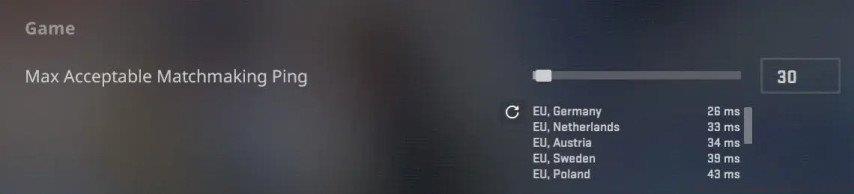
Configuring your maximum acceptable ping represents the most effective method for influencing server connections within CS2’s matchmaking system. This setting acts as a filter that prevents connections to servers exceeding your specified latency threshold, indirectly steering you toward better-performing regional data centers.
Follow this comprehensive setup process to optimize your connection preferences:
- Access the game’s settings menu from the main interface
- Navigate to the Game tab and locate the “Max Acceptable Matchmaking Ping” parameter
- Adjust the slider incrementally based on your geographic location and tolerance for latency
Strategic ping management requires balancing connection quality with reasonable queue times. Setting excessively low values may dramatically increase matchmaking duration, while overly permissive thresholds could result in suboptimal gameplay experiences. Most competitive players find 50-80ms provides the ideal balance between performance and availability.
Beyond basic ping configuration, several network optimization techniques can enhance your CS2 connection stability. Consider implementing a wired Ethernet connection rather than Wi-Fi to reduce packet loss and latency spikes, particularly during intense firefights where every millisecond counts.
Monitor your network performance using built-in net_graph metrics to identify patterns in server responsiveness. This data helps determine whether connection issues stem from your local network, internet service provider routing, or specific game server performance. Understanding these performance metrics translates well to other competitive shooters where network optimization is crucial.
Common configuration mistakes include setting maximum ping thresholds too aggressively, resulting in extended queue times without meaningful connection improvements. Additionally, failing to consider time-of-day server load variations can lead to inconsistent experiences. Peak hours often see increased latency across all regions as server resources become strained.
Valorant’s integrated server selection feature has been available since launch, providing players granular control over their connection destinations. This functionality allows squads to coordinate specific regional servers, ensuring balanced ping distribution among team members regardless of geographic dispersion.
The absence of similar functionality in CS2 represents a notable quality-of-life difference between the two premier tactical shooters. While CS2 developers focus on addressing more critical stability and performance issues, the community continues advocating for enhanced server selection options. Many players familiar with both titles appreciate how class selection and server management in other games create more predictable competitive environments.
Future updates may introduce similar region preference systems, particularly as CS2’s competitive scene continues evolving. The implementation would align with community expectations for a modern competitive shooter and reduce frustration among geographically diverse player groups. For now, mastering ping-based matchmaking influence remains essential for optimal CS2 performance, much like understanding comprehensive game mechanics in other shooters.
Action Checklist
- Configure Max Acceptable Matchmaking Ping between 50-80ms
- Switch to wired connection and optimize network settings
- Monitor net_graph data during different play sessions
- Coordinate with squad members on optimal play times
- Adjust ping thresholds based on time-of-day performance
No reproduction without permission:GameCDjnh » How to Change Server in CS2? Master CS2 server optimization with ping control strategies and practical connection tips