
Complete guide to purchasing and using Minecoins in Minecraft with expert tips and strategies
Understanding Minecoins and Their Benefits
For dedicated Minecraft enthusiasts seeking to enhance their gaming experience, Minecoins serve as the official virtual currency that unlocks a world of exclusive content. These digital coins provide direct access to premium marketplace offerings including character skins, texture packs, adventure maps, and mini-games that transform your gameplay. One significant advantage lies in price stability—while physical merchandise and third-party items often experience dramatic cost increases in various regions, Minecoins maintain consistent pricing through official channels.
The integration with your Xbox Live account creates a seamless ecosystem for digital purchases. This connection not only simplifies the transaction process but also enhances security, as your payment information remains protected within Microsoft’s trusted infrastructure. The account linkage ensures that your Minecoins and purchased content remain accessible across compatible devices, providing flexibility whether you’re playing on console, PC, or mobile platforms.
Step-by-Step Purchase Process
Initiating your Minecoins acquisition begins with launching the Bedrock Edition of Minecraft, which serves as the exclusive platform for accessing the official Marketplace. Once the game loads, navigate to the Marketplace section typically found on the main menu—this digital storefront showcases all available content purchasable with Minecoins.
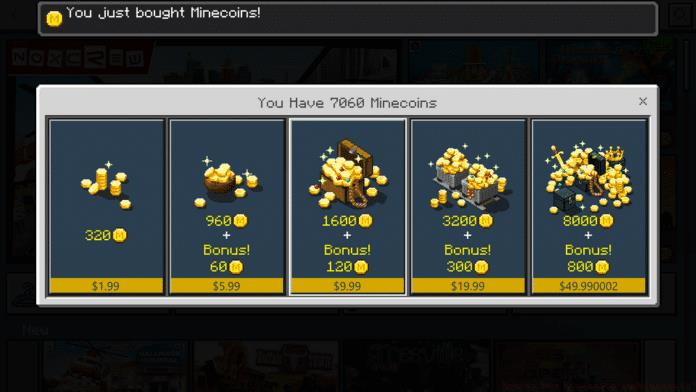
Locate the Minecoins purchase interface in the upper-right corner of the Marketplace screen. Here you’ll encounter multiple bundle options ranging from small packages suitable for occasional buyers to substantial bundles offering better value for frequent purchasers. Each bundle clearly displays the quantity of coins included and its corresponding price, allowing for informed decision-making based on your anticipated needs and budget.
After selecting your preferred bundle, the system will present a secure payment gateway. Input your preferred payment method details—credit card, PayPal, or Microsoft account balance—then confirm the transaction. Successful purchases receive immediate confirmation, and the Minecoins deposit into your account instantly, ready for marketplace spending.
Advanced Tips and Common Pitfalls
Seasoned Minecraft players recommend strategic bundle selection to maximize value—larger bundles typically offer more coins per dollar but require higher upfront investment. Analyze your purchasing patterns: if you frequently buy marketplace content, premium bundles provide better long-term value, while occasional shoppers may prefer smaller, more affordable options.
Payment optimization represents another crucial consideration. Linking a PayPal account or using Microsoft account balance can streamline future purchases and provide additional security layers. Regional pricing variations sometimes occur, so verifying current exchange rates for your country before purchasing can prevent unexpected charges.
Common transaction issues include payment gateway timeouts and delayed coin delivery. If Minecoins don’t appear immediately after purchase, avoid repurchasing—first check your transaction history and restart the game. Network connectivity problems during payment processing represent the most frequent cause of failed transactions, so ensure stable internet connection throughout the process. For persistent issues, Microsoft support provides dedicated assistance for Minecraft marketplace transactions.
No reproduction without permission:GameCDjnh » How to buy Minecoins in Minecraft? Complete guide to purchasing and using Minecoins in Minecraft with expert tips and strategies