
TL;DR
- Game creation limit doubled to 40 games, eliminating previous backend capacity constraints
- Console lobbies completely redesigned with private games, improved filtering, and dedicated game creator
- PC version gains search functionality, game information popups, and connection-based sorting
- Horadric Cube gets direct hotkey access and ‘Loot to Cube’ functionality
- Automap positioning can now be customized with auto-open settings
Diablo 2 Resurrected’s latest update, Patch 2.4.3, introduces significant improvements that directly address player frustrations with the game creation system. The patch focuses primarily on lobby functionality while delivering several quality-of-life enhancements that streamline the overall gaming experience.
Many dedicated players faced a common limitation: despite creating numerous games featuring different character classes, multiplayer configurations, skill builds, and D2R ladder items, they often needed to create additional games to expand their gameplay variety. However, backend server capacity previously couldn’t accommodate this level of game creation, forcing players to delete existing games before starting new ones.
This restrictive situation has been completely resolved. Players can now create up to 40 games simultaneously—double the previous limit—providing unprecedented flexibility for organizing different playthroughs, farming routes, and character development strategies.
The visual layout below demonstrates the comprehensive redesign of console lobby interfaces, making navigation more intuitive and feature-rich.
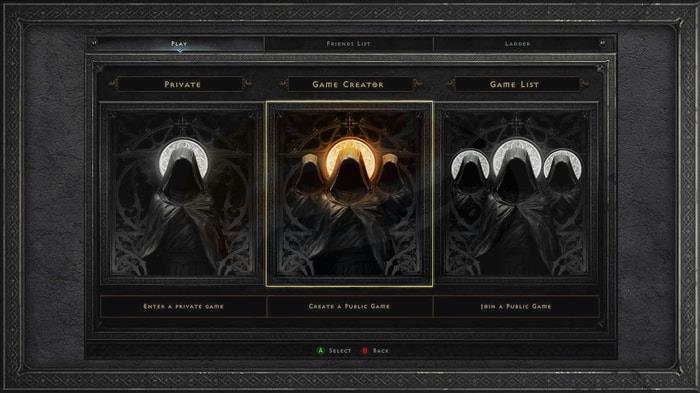
Private Game Options
When selecting the private game option, players can establish exclusive sessions accessible only to friends or specifically invited participants. These private games remain invisible in the public Game List, ensuring complete privacy for coordinated group play or solo farming sessions.
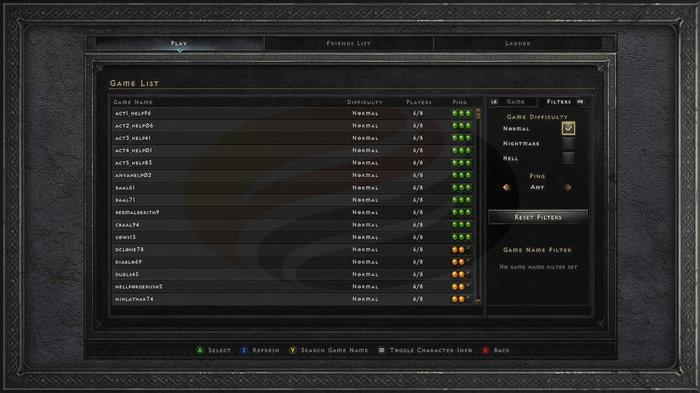
Enhanced Game List Features
The previously criticized Party Finder system has been permanently retired and replaced by the vastly superior Game List interface. This new system eliminates the frustrations players experienced with limited matchmaking options and unreliable party formation.
Players can utilize advanced search capabilities to pinpoint desired games by configuring multiple filtering parameters. Available search criteria include: Difficulty level, Connection ping quality, and specific Game Names.
Quick access shortcuts for Game Name filtering vary by platform:
PlayStation: Triangle button
Xbox: Y button
Nintendo Switch: X button
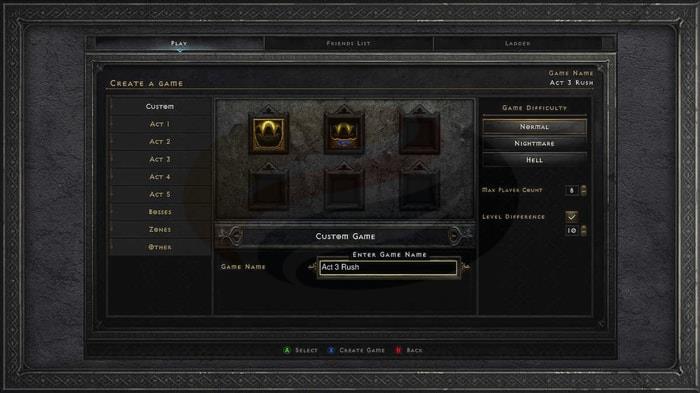
Game Creator Updates
The Custom category represents a significant addition to the Game Creator toolkit. Players can leverage its dual configuration options to establish games tailored to specific playstyles or farming requirements.
Game creation options now include establishing public games visible in the Game List or creating password-protected sessions that function as public games with access restrictions.
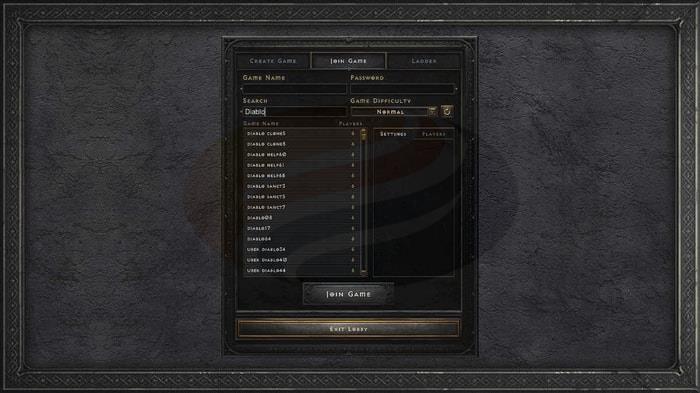
PC players receive substantial lobby enhancements with the introduction of comprehensive search functionality. This allows for rapid location of preferred games using specific keywords or exact game names, dramatically reducing the time spent browsing through irrelevant sessions.
When hovering the mouse cursor over any game name in the list, detailed game information automatically displays in a popup window. This provides immediate access to critical details without needing to join the game first.
Game discovery becomes significantly more efficient as the Game List now automatically categorizes available sessions according to connection quality metrics. This intelligent sorting ensures players can quickly identify games with optimal performance characteristics.
The Horadric Cube receives significant usability improvements with direct access through bindable hotkeys for mouse and keyboard configurations. Alternatively, players can continue accessing it via the traditional inventory menu button, providing flexibility for different playstyles.
The new ‘Loot to Cube’ functionality revolutionizes inventory management by enabling rapid collection of D2R items directly into the Horadric Cube. This eliminates the tedious process of manually transferring items and streamlines farming efficiency.
Automap customization reaches new levels of personalization with the Automap Auto Open setting. Players can now configure their preferred automap positioning, ensuring the interface elements align with their individual gameplay preferences and screen layout requirements.
Action Checklist
- Create up to 40 simultaneous games for different farming routes and character builds
- Configure private games for exclusive sessions using the new console lobby options
- Utilize advanced search filters by difficulty, ping, and game name to find optimal sessions
- Set up Horadric Cube hotkeys and enable ‘Loot to Cube’ for efficient item management
- Customize automap positioning with Auto Open settings for personalized interface layout
No reproduction without permission:GameCDjnh » Diablo 2 Resurrected: Updates and Improvements from Patch 2.4.3 Diablo 2 Resurrected Patch 2.4.3 brings major lobby improvements, doubled game creation limits, and quality-of-life enhancements