
Master CSGO knife commands for custom games with setup guides, troubleshooting tips, and advanced techniques
Understanding CSGO Knife Commands
CSGO knife commands provide players with powerful tools to manipulate weapon spawns within custom gaming environments. These console commands serve multiple practical purposes beyond simple entertainment, including weapon testing, skin evaluation, and gameplay experimentation. Understanding their proper implementation can significantly enhance your practice sessions and custom match experiences.
The primary function of these commands revolves around weapon spawning mechanics, allowing you to instantly generate specific knife types during offline sessions. This functionality proves particularly valuable for players wanting to preview expensive knife skins before making purchase decisions, test animation differences between weapon models, or create specialized training scenarios. Unlike competitive matchmaking, custom games offer a sandbox environment where these commands operate without restrictions.
It’s crucial to recognize that these tools function exclusively in custom or offline server configurations where cheat protection mechanisms remain disabled. Attempting to execute them in official Valve servers or competitive matchmaking will result in command rejection and potential account restrictions. The commands provide a safe testing ground for weapon mechanics but maintain no functionality in regulated gameplay environments.
Setting Up Your Custom Game Environment
Establishing a proper custom game environment requires systematic configuration of both client and server settings. Begin by activating the developer console through your game settings menu—this essential tool serves as your gateway to advanced command functionality. Navigate to Game Settings > Enable Developer Console to unlock this critical interface, which will become your primary method for executing knife commands and other advanced game modifications.
Once console access gets established, create an offline practice server using specific map loading commands. The most efficient approach involves typing “map” followed by your desired map name directly into the console interface. For instance, to initialize a practice session on Mirage, input “map de_mirage” without quotation marks. This command instantly generates a local server where you can safely experiment with various weapon commands and game modifications.
Critical server configuration involves enabling cheat commands through the “sv_cheats 1” console input. This parameter adjustment temporarily disables anti-cheat protections within your local server, permitting the execution of developer commands. Additionally, implement “mp_drop_knife_enable 1” to activate knife dropping functionality—a prerequisite for certain weapon spawning sequences. Always ensure you’ve cleared your current weapon loadout before attempting knife command execution to prevent conflicts with existing equipment.
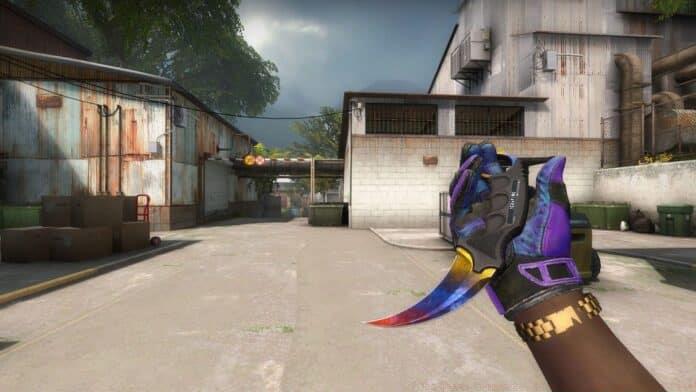
Complete Knife Command Reference
Mastering CSGO knife commands requires understanding the specific syntax for each weapon type. The fundamental command structure begins with “give weapon_” followed by the precise knife designation. Below you’ll find the comprehensive command list for spawning every available knife variant within the game, presented with proper formatting and execution notes.
The command is: give weapon_knife
The command is: weapon_knife_t
The command is: give weapon_knifegg;ent_fire weapon_knife addoutput “classname weapon_knifegg”
The command is: give weapon_knife_css;ent_fire weapon_knife addoutput “classname weapon_knifegg”
The command is: give weapon_bayonet;ent_fire weapon_knife addoutput “classname weapon_knifegg”
The command is: give weapon_knife_flip;ent_fire weapon_knife addoutput “classname weapon_knifegg”
The command is: give weapon_knife_gut;ent_fire weapon_knife addoutput “classname weapon_knifegg”
The command is: give weapon_knife_karambit;ent_fire weapon_knife addoutput “classname weapon_knifegg”
The command is: give weapon_knife_m9_bayonet;ent_fire weapon_knife addoutput “classname weapon_knifegg”
The command is: give weapon_knife_tactical;ent_fire weapon_knife addoutput “classname weapon_knifegg”
The command is: give weapon_knife_butterfly;ent_fire weapon_knife addoutput “classname weapon_knifegg”
The command is: give weapon_knife_falchion;ent_fire weapon_knife addoutput “classname weapon_knifegg”
The command is: give weapon_knife_push;ent_fire weapon_knife addoutput “classname weapon_knifegg”
The command is: give weapon_knife_survival_bowie;ent_fire weapon_knife addoutput “classname weapon_knifegg”
The command is: give weapon_knife_ursus;ent_fire weapon_knife addoutput “classname weapon_knifegg”
The command is: give weapon_knife_gypsy_jackknife;ent_fire weapon_knife addoutput “classname weapon_knifegg”
The command is: give weapon_knife_stiletto;ent_fire weapon_knife addoutput “classname weapon_knifegg”
The command is: give weapon_knife_widowmaker;ent_fire weapon_knife addoutput “classname weapon_knifegg”
The command is: give weapon_knife_ghost;ent_fire weapon_knife addoutput “classname weapon_knifegg”
The command is: give weapon_knife_canis;ent_fire weapon_knife addoutput “classname weapon_knifegg”
The command is: give weapon_knife_cord;ent_fire weapon_knife addoutput “classname weapon_knifegg”
The command is: give weapon_knife_skeleton;ent_fire weapon_knife addoutput “classname weapon_knifegg”
The command is: give weapon_knife_outdoor;ent_fire weapon_knife addoutput “classname weapon_knifegg”
When executing these commands, pay close attention to syntax precision—missing semicolons or incorrect weapon identifiers represent the most common execution failures. For complex commands requiring multiple operations (those including ent_fire sequences), copy and paste the entire string rather than typing manually to prevent formatting errors. If a command fails to execute, verify your sv_cheats status and ensure you’ve properly dropped your current knife using the drop command.
Advanced Tips and Strategies
Beyond basic command execution, several advanced techniques can enhance your knife command experience. For skin evaluation purposes, combine knife spawning with specific map lighting conditions to accurately assess how different finishes appear in various environments. Maps like Dust II provide bright, natural lighting ideal for examining detail work, while darker maps like Nuke help evaluate visibility in low-light combat scenarios.
Performance optimization involves creating dedicated practice configurations that automatically execute your preferred commands upon server initialization. Develop custom configuration files containing your most frequently used knife commands, then execute them via the “exec” console command when starting practice sessions. This approach saves significant time compared to manual command entry and ensures consistent testing environments across multiple sessions.
Creative applications extend beyond simple weapon testing—consider using knife commands to create specialized training drills or mini-games. Develop knife-only deathmatch scenarios, create animation comparison setups, or build custom obstacle courses that require specific knife properties. These advanced applications transform basic command usage into comprehensive training tools that can genuinely improve your gameplay mechanics and weapon familiarity.
No reproduction without permission:GameCDjnh » CSGO Knife Commands: Play With Any Knife For Free! Master CSGO knife commands for custom games with setup guides, troubleshooting tips, and advanced techniques