
TL;DR
- Customize boss cast bars to 180% for better mechanic visibility
- Use Spiritbond sort macros to efficiently manage materia extraction
- Disable mount and battle music to maintain immersive zone audio
- Right-click items in quest windows for faster handover completion
- Optimize inventory organization with targeted sorting commands
Mastering Spiritbond mechanics provides significant advantages for materia acquisition and gear optimization in FINAL FANTASY XIV. When your equipment reaches 100% Spiritbond completion, you gain the ability to extract valuable materia that can enhance your combat performance or generate substantial gil through market board sales.
The visual indicator for Spiritbond readiness appears as white dots on your gear interface, eliminating the need for tedious mouse-over inspections of individual items. This streamlined approach saves considerable time during endgame content preparation.

Advanced Spiritbond Sort Macro
Implementing the Spiritbond sort macro revolutionizes your inventory management workflow. This powerful tool automatically organizes your armory chest by Spiritbond percentage in descending order, placing fully bonded items at the top for immediate extraction. The complete macro sequence includes:
/isort condition armoury spiritbond des
/isort execute armoury
Common mistakes include forgetting to execute both commands or applying the sort to the wrong inventory category. For optimal results, create separate macros for different gear types and assign them to easily accessible hotbars.
Combat effectiveness heavily depends on your ability to quickly interpret boss mechanics and cast indicators. Many players struggle with the default cast bar size during intense encounters, especially in high-end raids where milliseconds determine success or failure.
The solution involves navigating to HUD Layout settings, selecting the Target Bar, accessing UI Element Settings, enabling ‘Display Target Info Independently’, and scaling the Target Info progress bar to 180% or your preferred visibility level.

This adjustment provides approximately 40% faster reaction time for interrupt mechanics and AoE avoidance. Advanced players often combine this with custom color coding for different cast types, though that requires third-party tools not officially supported.
Pro tip: Create a separate HUD layout profile specifically for raid content, allowing quick switching between optimized configurations for different content types.
Mount music variety initially enhances immersion, but repeated exposure to the same tracks during extensive travel can become monotonous. The audio customization options in FFXIV provide sophisticated control over your auditory experience.
Access System Configuration, navigate to Sound Settings, and disable both ‘Play music when mounted’ and ‘Enable normal battle music’ to maintain consistent zone atmosphere.

This configuration preserves the carefully crafted ambient music of each region while eliminating disruptive audio transitions between combat and exploration phases.
Many players overlook that disabling battle music also improves concentration during difficult encounters by removing distracting musical cues that can mask important sound-based mechanics.
Quest item handover represents one of the most frequently performed inventory interactions, yet many players use inefficient methods that consume unnecessary time.
Instead of dragging items or using traditional right-click methods, simply right-click the items directly within the Item Request window interface. This method automatically locates and transfers the required items regardless of their inventory location.
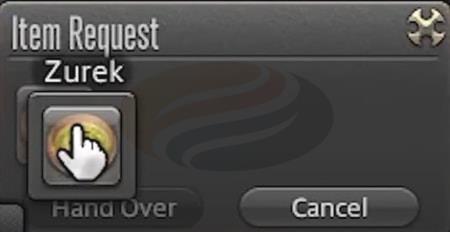
This technique becomes particularly valuable during beast tribe dailies or crafting quests requiring multiple item types scattered across different inventory sections.
Advanced inventory management combines this with regular sorting routines and retainer organization to maintain optimal workflow efficiency across all gameplay activities.
Action Checklist
- Create and test Spiritbond sort macro in your User Macros
- Adjust boss cast bar size to 180% in HUD Layout settings
- Configure audio settings to disable mount and battle music
- Practice right-click item handover method in quest windows
- Set up dedicated HUD profiles for different content types
No reproduction without permission:GameCDjnh » Convenient Tricks for FINAL FANTASY XIV – Quality of Life Tips Essential FFXIV UI optimization tips and efficiency tricks to enhance your gameplay experience