
TL;DR
- Create or login to TikTok account and prepare for live stream participation
- Watch official Minecraft partner streams with active commenting to avoid bot detection
- Receive automatic code notification after sufficient watch time and engagement
- Redeem code through Minecraft’s official redemption portal for TikTok cape
- Access new cosmetic item through Bedrock Edition character creator system
Minecraft marks its monumental 15th anniversary this year with exclusive Character Creator rewards, including a special TikTok partnership cape for Bedrock Edition players. This collaboration represents one of the most significant cosmetic collaborations in Minecraft’s history, offering players unique customization options.
The TikTok cape serves as a commemorative item celebrating both Minecraft’s longevity and its partnership with the popular social platform. Unlike previous anniversary rewards, this cosmetic item requires active participation in live streaming events rather than simple login bonuses or purchase requirements.

Bedrock Edition players should note this cosmetic item functions exclusively within the Character Creator system, meaning it won’t appear in Java Edition or other Minecraft variants. The cape represents a limited-time opportunity tied specifically to the anniversary celebration period.
Begin your journey to acquiring the exclusive TikTok cape by establishing proper account access. You’ll need either an existing TikTok account or must create a new one through the official TikTok website or mobile application.
- Navigate directly to TikTok’s official website to ensure you’re accessing the legitimate platform rather than third-party applications that might not support the Minecraft integration properly.
- If creating a new account, use a valid email address you regularly access since redemption codes and notifications will be sent through TikTok’s messaging system.
- For existing account holders, verify your login credentials work properly before the live stream events begin to avoid last-minute technical issues.
Account verification represents a crucial preliminary step many players overlook. Ensure your TikTok profile meets community guidelines and hasn’t received restrictions that might prevent participation in live stream events or code reception.
Participating in designated Minecraft live streams represents the core requirement for unlocking the TikTok cape reward. Mojang will announce official partner creators through their social media channels and Minecraft.net as the event approaches.
- Monitor official Minecraft social media accounts for creator announcements rather than relying on unofficial sources that might provide inaccurate information.
- During live streams, active participation through comments proves essential—TikTok’s system monitors engagement to differentiate legitimate participants from automated bots.
- While Mojang hasn’t specified exact watch time requirements, plan for at least 30-60 minutes of consistent viewing with periodic interaction to ensure system recognition.
Technical considerations include ensuring stable internet connectivity throughout the viewing session and avoiding multiple tab browsing that might reduce effective watch time calculation. The notification containing your redemption code should arrive automatically once participation thresholds are met.
For those interested in broader gaming strategies, our Complete Guide offers comprehensive approaches to mastering modern gaming events and rewards systems across different titles.
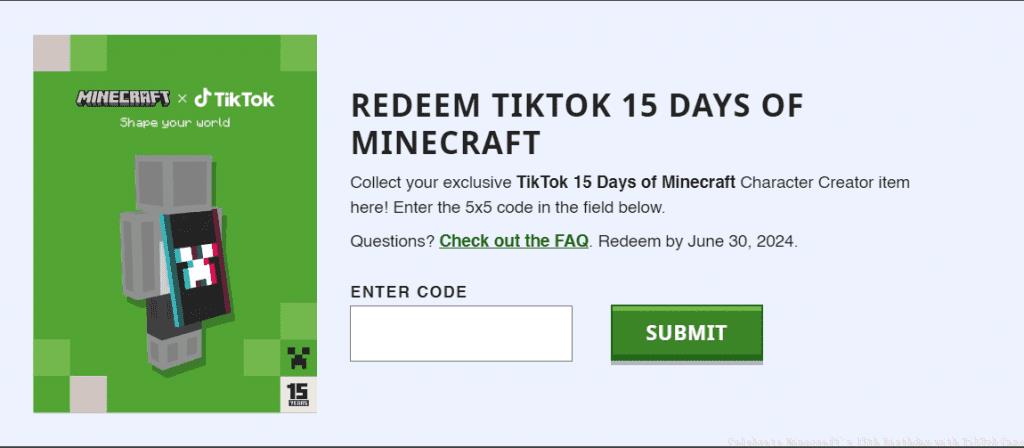
Once you receive your redemption code through TikTok notifications, the final step involves claiming your cosmetic reward through Minecraft’s official systems. This process requires accessing the dedicated redemption portal rather than in-game menus.
- Navigate to the Minecraft Redemption page through your preferred browser—this specialized portal handles promotional code processing separately from the Minecraft Marketplace.
- Locate the “Redeem TikTok 15 days of Minecraft” banner specifically, as other redemption options won’t process the TikTok cape code properly.
- Enter the alphanumeric code exactly as received, including hyphens if present, and submit for verification. Case sensitivity typically doesn’t apply, but copying directly from your notification prevents errors.
- After successful redemption, launch Minecraft Bedrock Edition and access the Character Creator section where your new TikTok cape will appear in the cape customization options.
If you encounter issues during this process, our Weapons Unlock guide includes troubleshooting sections that apply broadly to gaming redemption systems and might provide helpful solutions.
Maximize your chances of successfully obtaining the TikTok cape with these expert strategies and problem-solving approaches developed through extensive gaming event experience.
Optimization Strategies:
- Participate in multiple creator streams to increase watch time accumulation—the system typically tracks cumulative viewing across eligible broadcasts.
- Space comments naturally throughout the stream rather than rapid-fire messaging, which might trigger spam detection systems.
- Use TikTok’s official mobile application for streaming since some features might not function optimally in browser-based viewing.
Common Problems and Solutions:
- If no code arrives after sufficient viewing, check TikTok’s notification settings and ensure you haven’t disabled promotional messages.
- For redemption errors, verify you’re using the correct regional redemption portal matching your Minecraft account region.
- If the cape doesn’t appear in Character Creator, try logging out and back into your Minecraft account to refresh cosmetic inventories.
Understanding these gaming mechanics can enhance your overall experience. For more advanced strategic approaches, our Class Guide delves deep into character customization systems across different gaming platforms.
Remember that time-limited events like this often experience server load during peak participation hours—early or late viewing might provide smoother experiences with fewer technical complications.
Action Checklist
- Create/verify TikTok account with valid email
- Monitor Minecraft social media for partner creator announcements
- Watch designated live streams with active commenting for 30+ minutes
- Check TikTok notifications for redemption code delivery
- Redeem code through official Minecraft redemption portal
- Verify cape appears in Bedrock Edition Character Creator
No reproduction without permission:GameCDjnh » Celebrate Minecraft’s 15th Birthday with TikTok Cape Complete guide to claiming Minecraft's 15th anniversary TikTok cape with expert tips and troubleshooting advice